Store URL & Handle
Configure the RedERP ecommerce shop handle, public subdomain URLs, and one-store-per-account rules.
Overview
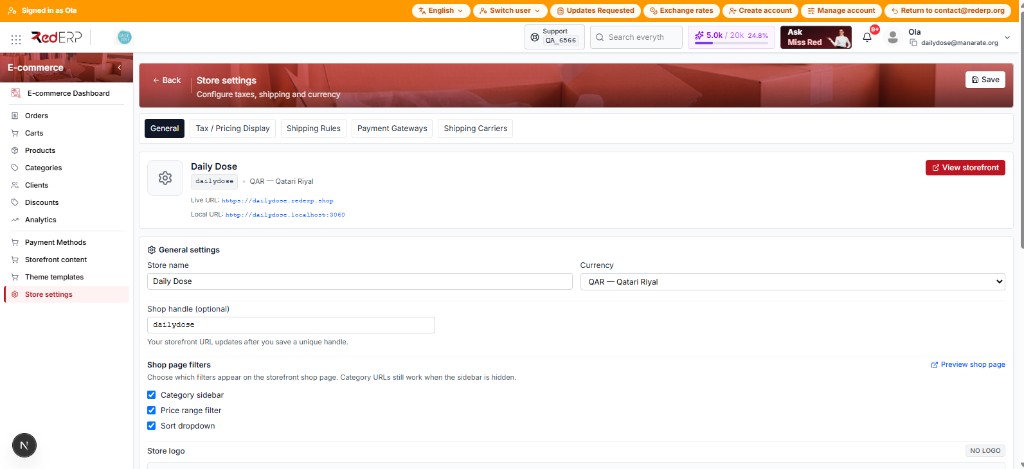
Each ERP account has one ecommerce store and one public handle (store_domain). The storefront is served on a subdomain, not a path under the ERP app.
URL patterns
| Environment | Pattern | Example |
|---|---|---|
| Production | https://{handle}.rederp.shop | https://dailydose.rederp.shop |
| Local | http://{handle}.localhost:3060 | http://dailydose.localhost:3060 |
Plain localhost without a subdomain can use the backend env fallback ECOMMERCE_DEV_STORE_HANDLE.
Set or change the handle (step by step)
- Open E-commerce → Store settings → General.
- Enter Shop handle (stored as
store_domain). - Click Save at the top.
- Copy the preview URL / open View storefront only after Save.
Unsaved handle changes do not update the live URLs shown in the preview.
Handle rules
- Length 3–50 characters
- Lowercase letters, numbers, hyphens:
^[a-z0-9]+(?:-[a-z0-9]+)*$ - Not reserved (
www,api,admin, …) - Must be globally unique
Errors you may see
| Message | Meaning |
|---|---|
store_domain is already taken | Another account owns that handle |
store_domain format is invalid | Bad characters / pattern |
store_domain is reserved | System-reserved slug |
Store not found | Handle missing, wrong, or store not resolvable |
How the storefront finds your shop
Resolution order:
- Header
x-shop-handle - Query
shop_handle/handle - Host subdomain (
{handle}.…) - Dev fallback env on plain localhost
Trainers: always open the shop via the handle subdomain, not a random host.
One account = one store
There is a single ecommerce settings row per account_id. You cannot run multiple public handles for the same account. Need a second brand? Use a second RedERP account (or a future multi-store feature if product adds it).