Carts & Recovery
Manage ecommerce carts, checkout from ERP, and send abandoned-cart recovery emails.
E-commerce → Carts is for staff-built baskets (phone orders, counter sales). Most online checkouts never appear here — they go straight to Orders. Title: Carts — Draft orders for phone or in-store sales — add items, then checkout to create an order.
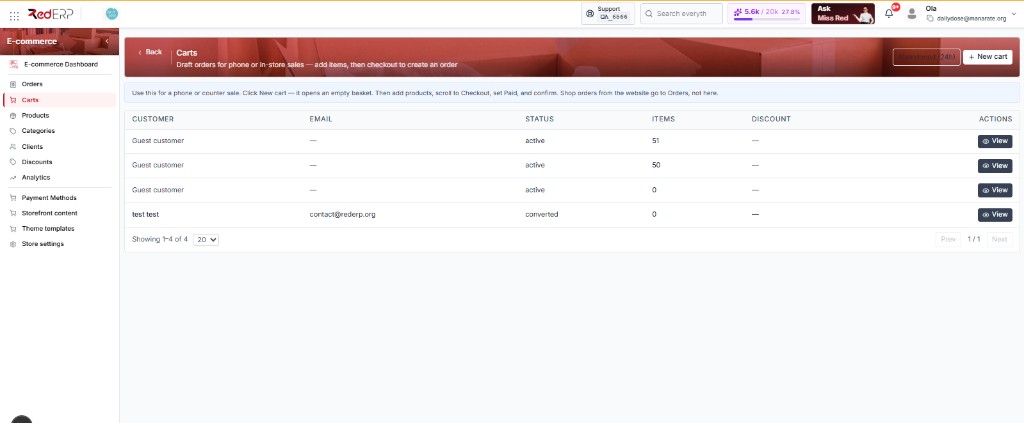
The blue banner on the page says the same: carts are temporary baskets for manual sales. You usually do not need this page unless someone is building an order by hand.
The list
Abandoned (24h), + New cart, and the empty state.
Build then convert
Add items and a promo, then checkout to an order.
Auto from Store settings, or Send recovery on a cart.
The carts list
Open E-commerce → Carts.
| Control | What it does |
|---|---|
| + New cart | Start a draft basket |
| Abandoned (24h) | Show carts idle for a day — useful when investigating drop-offs |
Table columns
| Column | What you see |
|---|---|
| Customer | Name (or guest) |
| Needed for recovery mail | |
| Status | Open / converted |
| Items | Line count |
| Discount | Promo if applied |
| Actions | Recover (needs an email; hidden once converted) and View. Checkout and delete live on the cart detail, not this table. |
A new store shows No carts found. That is normal if all sales come from the storefront.
After checkout, the cart may leave this live list and appear as a read-only snapshot in local history.
Create and edit
Create a cart
Click + New cart. Link an existing client or leave it as a guest.
Add products
Add products and quantities.
Optional promo
Apply or remove a promo code from Discounts. A promo can apply without full edit mode.
Checkout
Enter customer name and email, payment status, and notes. Checkout creates an order. Guest carts are allowed if name and email are set here.
Recovery emails
Automatic
Configured in Store settings → General:
- Email notifications ON
- Auto recovery ON
- Idle hours (1–168)
Manual
On a list row click Recover (tooltip: Send recovery). Needs an email, and the cart must not already be converted. Open View to checkout or delete.
Shoppers open:
/cart?recover=TOKEN/checkout?recover=TOKEN
Invalid or expired tokens show a clear failure on the storefront. After a successful conversion, recovery should stop.
Tips
- Recovery needs a customer email on the cart
- Test with a real inbox before you turn on auto recovery for shoppers