Online Orders
View, create, and fulfill RedERP ecommerce orders — payment, handling, and shipment statuses.
E-commerce → Orders lists storefront orders and orders created in the ERP. Title: Orders — Manage online orders and fulfillment.
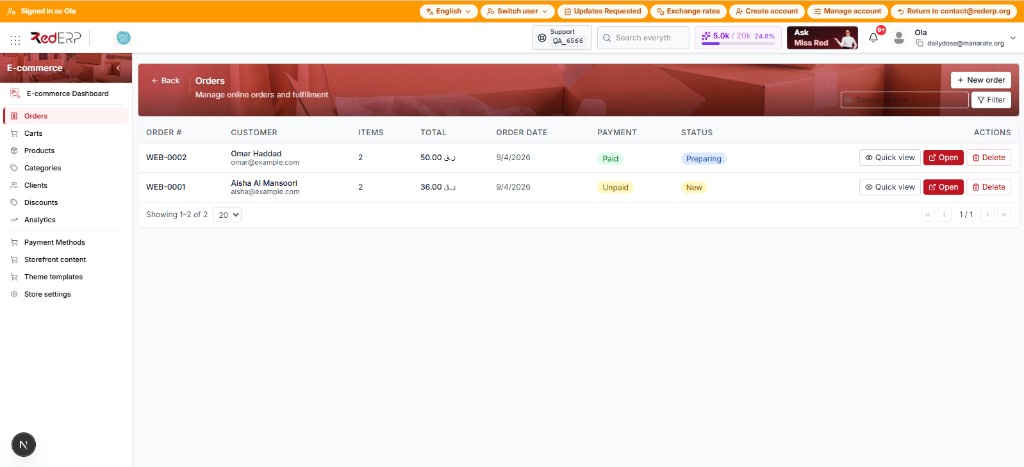
The list
Search, Filter, + New order, Quick view, Open.
Three axes
Payment, order handling, and shipment are separate.
Full page
Lines, notes, shipment stepper, and tracking.
The orders list
Open E-commerce → Orders.
| Control | What it does |
|---|---|
| + New order | Opens the create drawer (guest or existing client) |
| Search | Find by order number, name, or email |
| Filter | Narrow by order status and payment status |
Table columns
| Column | What you see |
|---|---|
| Order # | Public number, e.g. WEB-0001, WEB-0002 |
| Customer | Name and email |
| Items | Line quantity |
| Total | Amount in store currency (e.g. QAR) |
| Order date | When it was placed |
| Payment | Badge: Unpaid (yellow), Paid (green), Failed, Refunded |
| Status | Handling badge: New (yellow), Preparing (blue), Packed, Cancelled, Refunded |
| Actions | Quick view, Open, Delete |
Example: WEB-0002 Omar Haddad is Paid / Preparing. WEB-0001 Aisha Al Mansoori is Unpaid / New.
| Button | What it does |
|---|---|
| Quick view | Drawer with a summary and quick status updates |
| Open | Full order page (shipping stepper and tracking) |
| Delete | Remove the order when your role allows it |
Quick view
Click Quick view on a row. The drawer title is the order number. The subtitle says Quick summary — open full order for shipping & tracking.
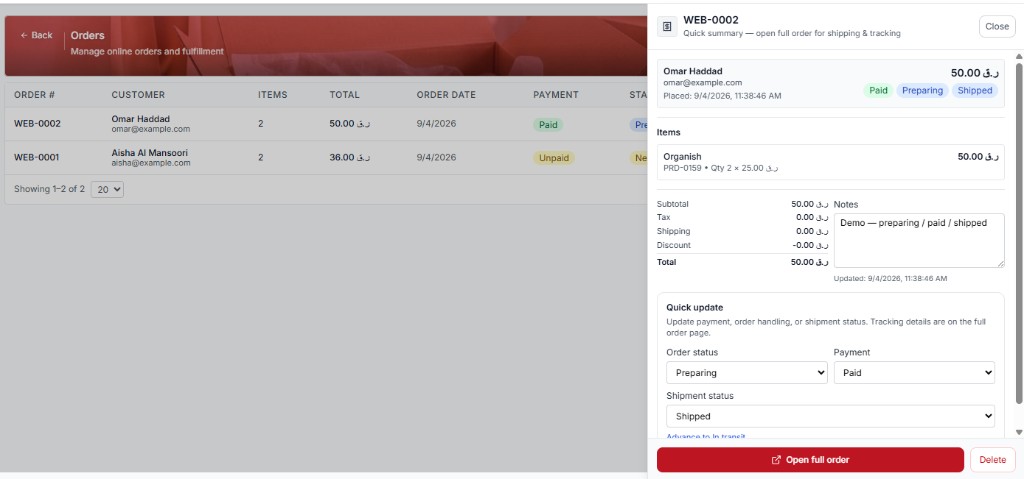
You see customer name and email, placed time, total, three badges (Paid, Preparing, Shipped), line items (example: Organish × 2), subtotal / tax / shipping / discount / total, and notes.
Quick update lets you change Order handling, Payment status, and Shipment status without leaving the list. The Advance to … button moves shipment one step (the label is the next status, for example Advance to shipped). Tracking lives on the full page — click Open full order. Unsaved changes need Save status.
Three status axes
Keep these separate in training and operations.
| Axis | Typical values |
|---|---|
| Payment | unpaid · paid · failed · refunded |
| Order handling | New · Preparing · Packed · Cancelled · Refunded |
| Shipment | pending → shipped → in_transit → delivered (+ returned) |
Packed ≠ delivered. The UI may warn if handling is fulfilled but shipment is not delivered yet.
Cancelled / refunded orders lock shipment edits. Marking delivered may set the actual delivery date.
Create an order
Open the drawer
Click + New order. Choose Guest customer or link an existing client.
Name and email
Both are required. Add at least one item (product + quantity). Optional: discount and notes.
Set the first statuses
Order status (handling) and Payment. Click Create order.
Create fails with Insufficient stock if the product has qty ≤ 0 and allow-negative is off. It fails with Invalid or inactive payment gateway if checkout has no active gateway — manual create from this page does not need a shopper checkout.
Detail page
Click Open or Open full order. The header shows Order WEB-0001 (or the number you opened), customer name and email, Edit, and the total.
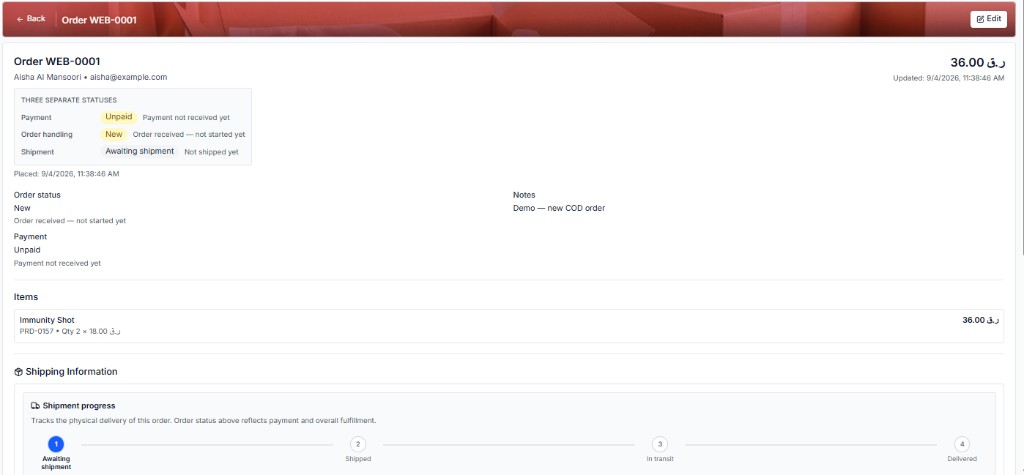
A grey box titled THREE SEPARATE STATUSES repeats the three axes:
| Axis | Example on WEB-0001 |
|---|---|
| Payment | Unpaid — Payment not received yet. |
| Order handling | New — Order received — not started yet. |
| Shipment | Awaiting shipment — Not shipped yet. |
Below that: Placed date, the same statuses again, Notes (example: Demo — new COD order), and Items (product name, SKU, qty × unit price, line total).
Shipping and payment
Scroll down for Shipping Information and Payment Information.
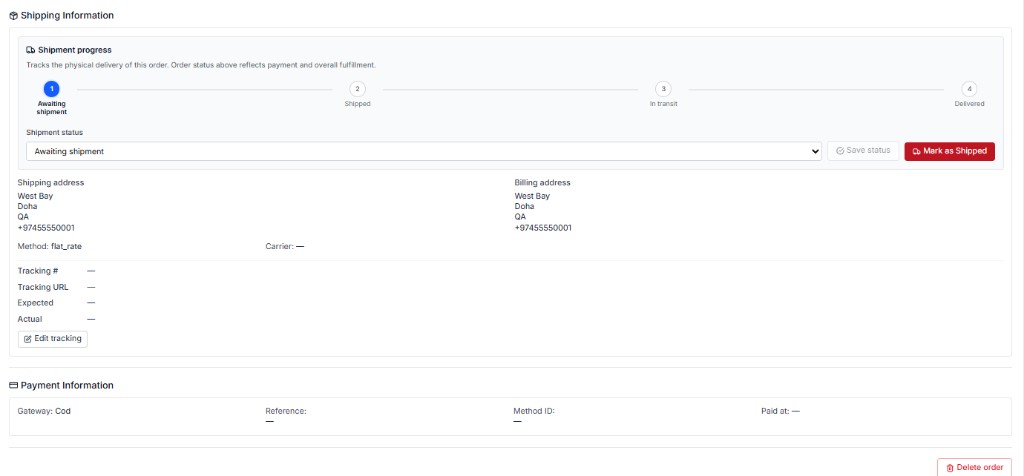
The shipment progress bar has four steps: Awaiting shipment → Shipped → In transit → Delivered. The note says shipment tracks physical delivery; payment and handling stay in the statuses above.
| Control | What it does |
|---|---|
| Shipment status | Dropdown for the current step |
| Save status | Saves a dropdown change (grey until you change it) |
| Mark as Shipped | Advances to Shipped |
| Shipping / Billing address | Customer addresses |
| Method | e.g. flat_rate |
| Carrier | From Store settings → Carriers, or — |
| Edit tracking | Tracking #, URL, expected and actual dates |
| Payment Information | Gateway (e.g. Cod), reference, method ID, paid at |
On a later order (e.g. WEB-0002) you may already see Shipped, a carrier such as local, and a tracking number. Delete order is at the bottom of the page.
Payments
- COD — often stays unpaid until cash is collected; update payment status manually when paid
- Stripe — paid status may come from webhooks; do not assume the UI toggle replaces webhooks
- Missing/inactive gateway at storefront checkout → order creation fails there
Troubleshooting
| Issue | Check |
|---|---|
| Invalid or inactive payment gateway | Store settings → Payments |
| Insufficient stock | Product qty + allow-negative |
| No confirmation email | Email notifications, reply-to, provider |
| Order not on list | Date filters; cart checkout completed? |