Ecommerce Emails
Which RedERP ecommerce emails send, what settings gate them, and how to configure sender and reply-to.
Overview
Ecommerce emails are sent from the backend (SendGrid / mail env). Most order and payment messages respect email notifications; a few do not.
Configure sender fields under E-commerce → Store settings → General.
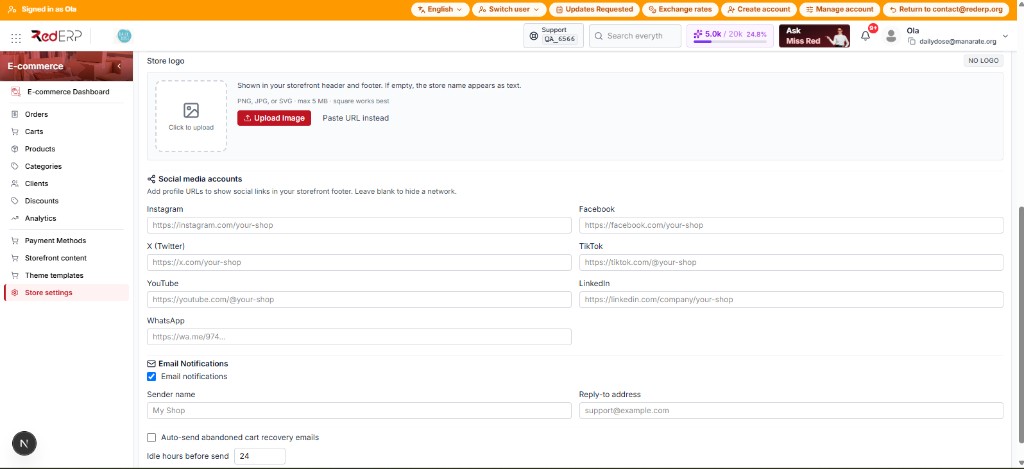
Configure sender (step by step)
- Open Store settings → General.
- Turn Email notifications ON (required for order/payment/recovery).
- Set Sender name (falls back to store name).
- Set Reply-to (falls back to account email). Required for reliable replies and contact inbox.
- Save.
System From address comes from server env (SENDGRID_FROM_EMAIL / MAIL_FROM), not the ERP form.
Email catalog
Order & fulfillment
| When it sends | |
|---|---|
| Order confirmed | COD on create; Stripe after paid (webhook / confirm) |
| Ready for shipping | Fulfillment progress (when triggered by ops flow) |
| Order shipped | Delivery status → shipped |
| Order delivered | Delivery status → delivered |
| Order cancelled | Cancellation flow |
Payments
| When | |
|---|---|
| Payment successful | Stripe paid |
| Payment failed | Stripe payment failed |
| Payment refunded | Stripe charge refunded |
Cart & account
| When | Gated by notifications? | |
|---|---|---|
| Abandoned cart | Auto idle hours or Carts → Send recovery | Yes (+ auto recovery for auto send) |
| Password reset | Forgot / reset password | No |
| Contact message | Shopper submits /contact | No (needs reply-to / inbox) |
If notifications are off, order/payment/cart emails skip with reason email_notifications_disabled.
Line items and variants
Confirmation, abandoned cart, fulfillment, and payment emails list what was bought, including pack size or flavor (variant_label). Example: Cow kefir with 500ml on a second line, not only the parent product name.
Shoppers also see the same option under My account → order details (and as a preview on the orders list).
If a product has required variants, storefront checkout must send variant_id. Emails only print the snapshot saved on the cart/order line.
Abandoned cart email (step by step)
- Email notifications ON.
- Auto recovery ON.
- Idle hours between 1 and 168 (default 24).
- Save.
- Optional: open Carts → Send recovery for a specific cart (needs customer email).
Link format: {storefront}/cart?recover={token}.
Contact form mail
- Shopper fields: name, email, message
- Delivered to store reply-to / account email
- Reply-To header = shopper email
- Error if inbox missing: Store contact inbox is not configured
Ops tips
- Test with a real inbox before go-live.
- COD vs Stripe: confirmation timing differs (see Stripe Go-Live).
- Shipment emails follow shipment status, not only order handling status.