Maintenance
Schedule vehicle service, set intervals on service types, and complete work to set the next due date.
Overview
Use Service Types for the catalog of work (oil change, inspection) and Maintenance for each scheduled or completed job. Paths: /modules/fleet/service-types and /modules/fleet/maintenance.
Service types
- Open Fleet Management → Service Types.
- Select Add.
- Enter the name (for training use
Oil Change). - Set interval days and/or interval km when the work repeats.
- Select Save.
Maintenance list
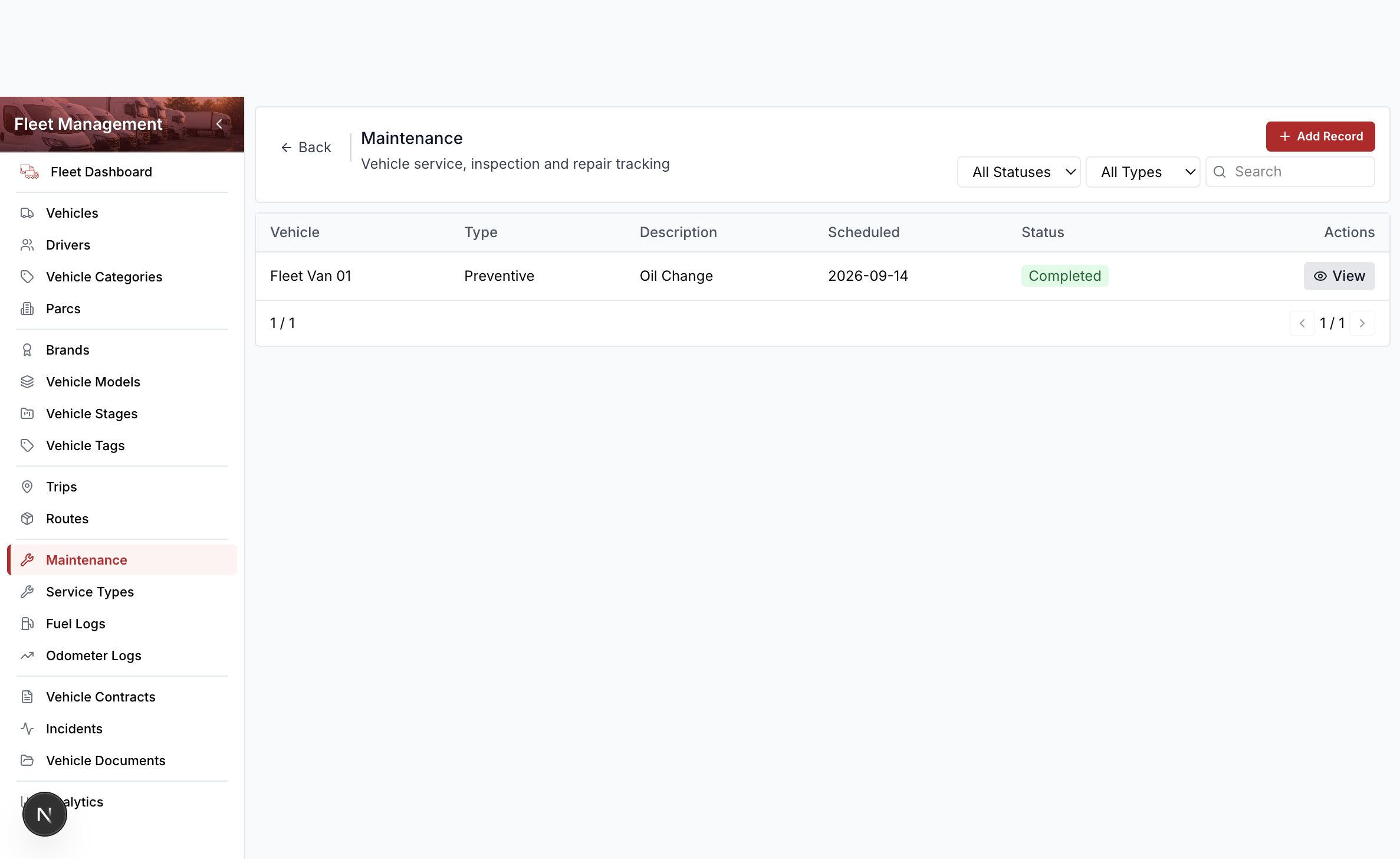
Columns include vehicle, type, description, scheduled date, and status. Row actions are View and, while the job is open, Edit and Complete. Delete lives in the edit drawer footer.
Schedule and complete
- Open Fleet Management → Maintenance.
- Select Add Record.
- Search and select the vehicle and service type.
- Optionally search for a vendor (supplier).
- Enter a description and scheduled date.
- Select Save.
- When the work is done, select Complete, enter the completed date, cost, and odometer, then select Complete in the header.
Completing a job that has a service-type interval writes next service date (from the completed date + interval days) and next service odometer (from the reading + interval km) on the vehicle. Those values appear on the vehicle drawer and feed the maintenance-due workspace widget.