Orders & accounting
How a Shopify order becomes an E-commerce order, a sales order, an invoice, a payment and ledger entries in RedERP — including refunds and cancellations.
Overview
Every Shopify order is recorded once in RedERP, whatever the path it took (first import, Synchronize, or the orders/create, orders/paid and orders/updated webhooks). A paid order is booked end to end without anyone typing anything.
The chain
Shopify order
The customer pays on your Shopify checkout. Shopify sends orders/create, then orders/paid.
E-commerce order SHP-####
An online order appears in E-commerce → Orders with the Shopify badge, the customer, the lines (product, variant, quantity, unit price), subtotal, shipping, tax, discount, total, currency, payment status and gateway. The number is the Shopify order number prefixed with SHP-.
Sales order
A sales order with the same reference is created in Sales → Sales orders, linked to the RedERP client.
Invoice SHPINV-####
When the order is paid, an invoice SHPINV-#### is issued against the client, posted to Accounts Receivable and Sales Revenue.
Payment and ledger
One payment per Shopify transaction is recorded on the invoice and posted: Bank debit, Accounts Receivable credit. Shopify Payments fees, when reported, are booked as an expense so the bank line matches your payout.
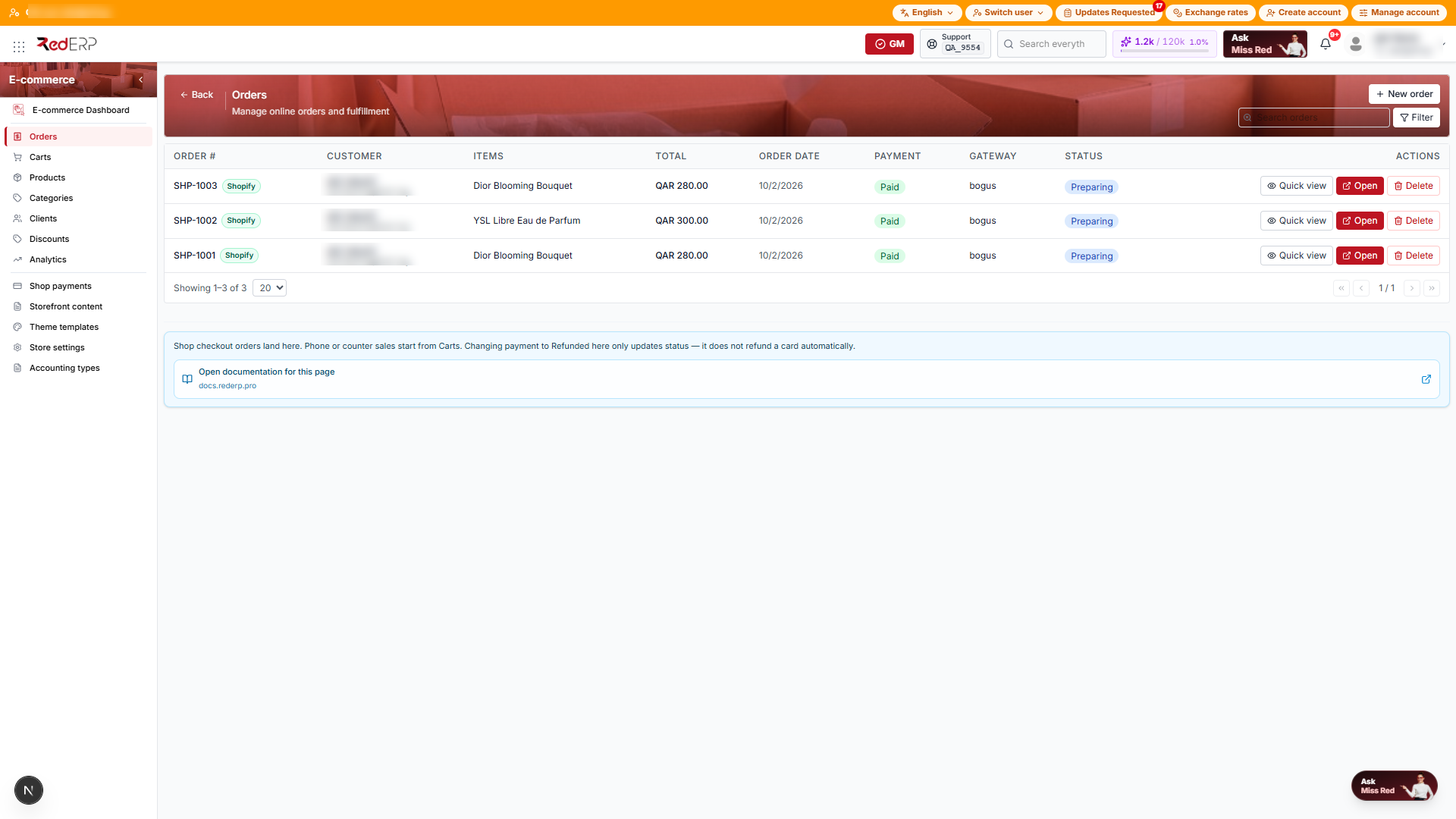
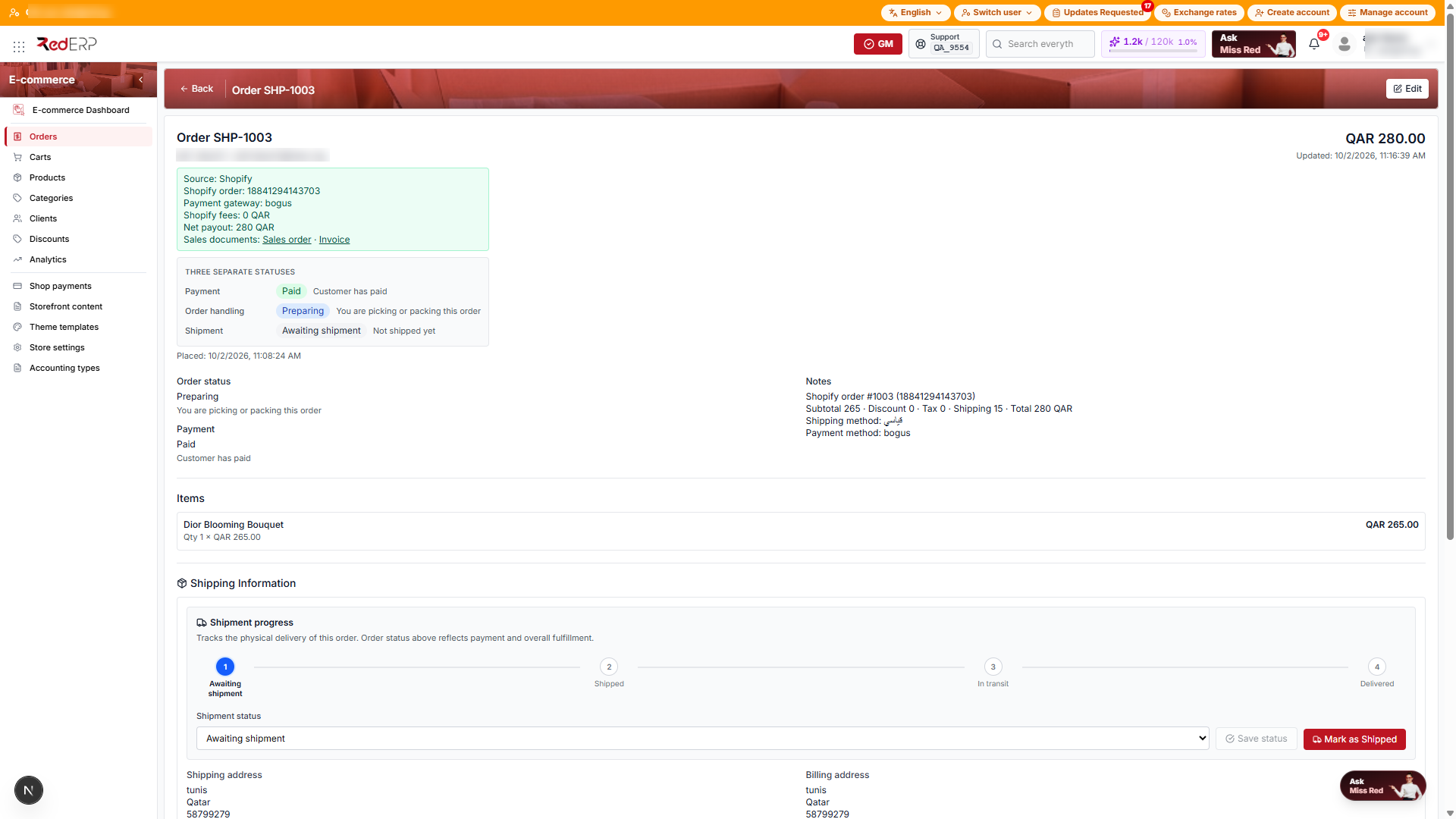
Reading a Shopify order in E-commerce
Open E-commerce → Orders and click a SHP- order. The green Source: Shopify box shows:
- Shopify order — the Shopify id of the order
- Payment gateway — for example
shopify_payments,manual, or a third-party gateway - Shopify fees and Net payout when Shopify reports transaction fees
- Sales documents — links to the sales order and the invoice
The usual three status axes still apply (payment, order handling, shipment) — see Online Orders. Shopify fulfilments move the shipment status to Shipped.
Which accounts are used
RedERP uses your chart of accounts — nothing is hard-coded:
| Posting | Account used |
|---|---|
| Invoice | The clients ledger mapped for sales invoices (Accounts Receivable) and your Sales Revenue account |
| Payment | The bank ledger mapped for sales payments |
| Shopify fees | An expense ledger named for fees (created as SHP-FEE if none exists) |
If your accountant wants Shopify booked elsewhere, set the overrides in Shopify → Settings (stock location, clients ledger, bank ledger). Leave them on Automatic otherwise.
Payment statuses
| Shopify financial status | E-commerce payment status |
|---|---|
pending, authorized | Unpaid |
paid | Paid |
partially_paid | Partially paid |
partially_refunded | Partially refunded |
refunded, voided | Refunded |
| failed transaction | Failed |
Refunds and cancellations
- Partial refund — a credit note is recorded for the refunded amount, the order shows Partially refunded.
- Full refund — the invoice and payment postings are reversed in the ledger and the order shows Refunded.
- Cancellation of a paid order — same reversal as a full refund; the order status becomes Cancelled.
- Cancellation before payment — the order is cancelled, nothing is posted.
Reversals are recorded once per order, so a repeated webhook never reverses twice.
Guest checkouts
If a Shopify order has no customer account, RedERP creates a guest client named after the order (for example Shopify guest #1003) and notes it in the sync job, so the invoice always has a client.
Tips
- Do not edit
SHP-orders in E-commerce to change amounts — the next synchronisation would keep Shopify's values. Change the order in Shopify instead. - To find all Shopify sales, filter Sales → Invoices by reference
SHPINV-.