Synchronisation
What RedERP imports from Shopify, how products, stock, categories and customers are matched, and when to use Synchronize or Full resync.
Overview
Synchronisation is one way: Shopify is the source, RedERP is the destination. The first import runs right after you connect; webhooks keep data live; Synchronize and Full resync are there when you want to be sure.
Go to Shopify → Synchronization or Shopify → Sync history.
What is imported
| Shopify | RedERP | Where you see it |
|---|---|---|
| Locations | Stock locations | Data Management → Locations |
| Products, images, brand (vendor) | Products with the Shopify badge, brand created if missing | E-commerce → Products |
| Variants (size, colour, SKU, barcode, price) | Product variants | E-commerce → Products → variants |
| Product type / collection | Product categories ("Imported from Shopify") | E-commerce → Categories |
| Inventory levels per location | Stock levels | E-commerce → Products → Stock |
| Customers (name, email, phone, addresses, tags, note) | Clients with the Shopify badge | E-commerce → Clients |
| Orders, line items, shipping, tax, discounts | E-commerce orders SHP-#### + Sales documents | E-commerce → Orders, Sales |
| Payments (transactions, fees) | Payments and ledger entries | Sales → Payments, Accounting |
| Refunds, cancellations, fulfilments | Credit note / reversal, status updates | E-commerce → Orders |
How records are matched
- Every imported record is linked to its Shopify id for that store. Running the import again updates the same record — it never creates a copy.
- Customers are matched by Shopify id first. If a Shopify customer has the same email as an existing RedERP client, that client is linked, not overwritten: your name, phone and addresses stay as they are.
- Categories and brands are matched by name (spaces and case ignored), so "Perfume" and "perfume" are one category.
- Shopify data that has no RedERP field (tags, notes, metafields) is kept in the client's custom fields so nothing is lost.
Synchronize vs Full resync
| Action | What it does | When to use it |
|---|---|---|
| Synchronize | Imports what changed since the last successful sync (with a 10-minute overlap so nothing falls between two runs). | Daily check, after a webhook error, after reconnecting. |
| Full resync | Walks through the whole store again and updates every record. Nothing is deleted in RedERP. | After a long disconnection, after bulk edits in Shopify, or when counts look wrong. |
Both buttons are disabled while a job is Running. Jobs are processed in the background; the page refreshes itself until the job ends.
Sync history
Shopify → Sync history lists every job:
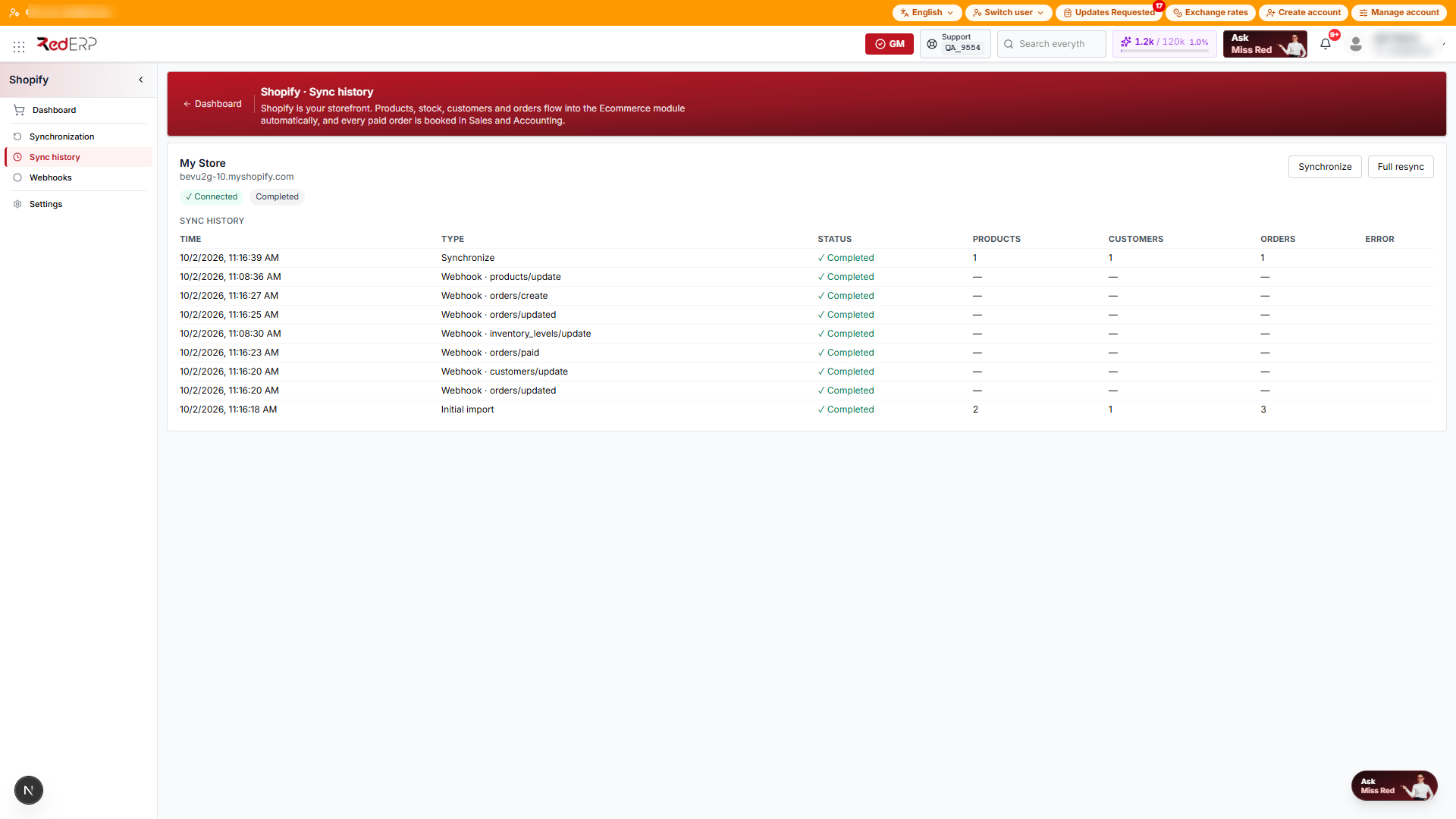
| Column | Meaning |
|---|---|
| Time | When the job finished (or was created if still queued). |
| Type | Initial import, Synchronize, or Webhook · topic (for example orders/paid). |
| Status | Queued, Running, ✓ Completed, ✗ Failed. |
| Products / Customers / Orders | Records processed by that job (import jobs only). |
| Error | The exact reason a job failed. |
A job is marked Completed only after every record was really saved. If one record cannot be saved, the job is Failed with the error, and the next Synchronize retries it.
Tips
- Product counts on the Dashboard are per store — a product sold in two stores counts once per store.
- Stock is imported per Shopify location. Set a default stock location in Settings only if you want all Shopify stock in one RedERP location.
- Deleting a product in Shopify deactivates it in RedERP; it is not deleted, so past orders keep their lines.