About Association
Complete association management: members and membership plans, donors and donations, pledges, campaigns, funds, sponsorships, grants, beneficiaries, assistance, volunteers, events and governance, with dual-copy receipt printing.
Overview
The Association module brings membership, fundraising, beneficiary programs, volunteers, events, governance, receipts, and reporting into one workspace.
Open Association from the module launcher or main sidebar, or go to rederp.ai/modules/association. The first screen is the Association Dashboard — Members, donations, programs and governance at a glance. The path is /modules/association.
How records connect
| Record | What it is | Next step |
|---|---|---|
| Application | A membership candidate under review | Approve to create a Member and membership, or reject with a reason |
| Member | An accepted person with status, dates, and branch | Pay membership fees, renew, or open the linked client wallet |
| Membership Plan | Registration fee, recurring fee, billing frequency, validity, and grace period | Assign when approving an application or on the Memberships screen |
| Membership | A member linked to a plan for a period (/modules/association/renewals) | Generate or collect fees; run renewals and expiry sweeps |
| Donor | An individual or organization that contributes | Record a Donation, Pledge, or Sponsorship |
| Donation | Money already received | Set Campaign and Fund on the donation record; payment issues a Receipt |
| Pledge | A commitment, often with installments | Pay each installment from the schedule; each payment issues a receipt |
| Campaign / Fund | Fundraising target or restricted balance | Link from donations and pledges for allocation and reporting |
| Beneficiary | A person receiving program support | Log an Assistance request; approved distributions issue receipts |
| Receipt | Audit record after a supported payment | Print both copies; reopen from Receipts to reprint or cancel with a reason |
Payments from membership fees, donations, pledge installments, sponsorships, grant tranches, and event registrations create receipts. Assistance payouts issue receipts when money is distributed. Committees, board roles, meetings, resolutions, elections, compliance, and cases document governance and follow-up separately from the cash register.
Dashboard
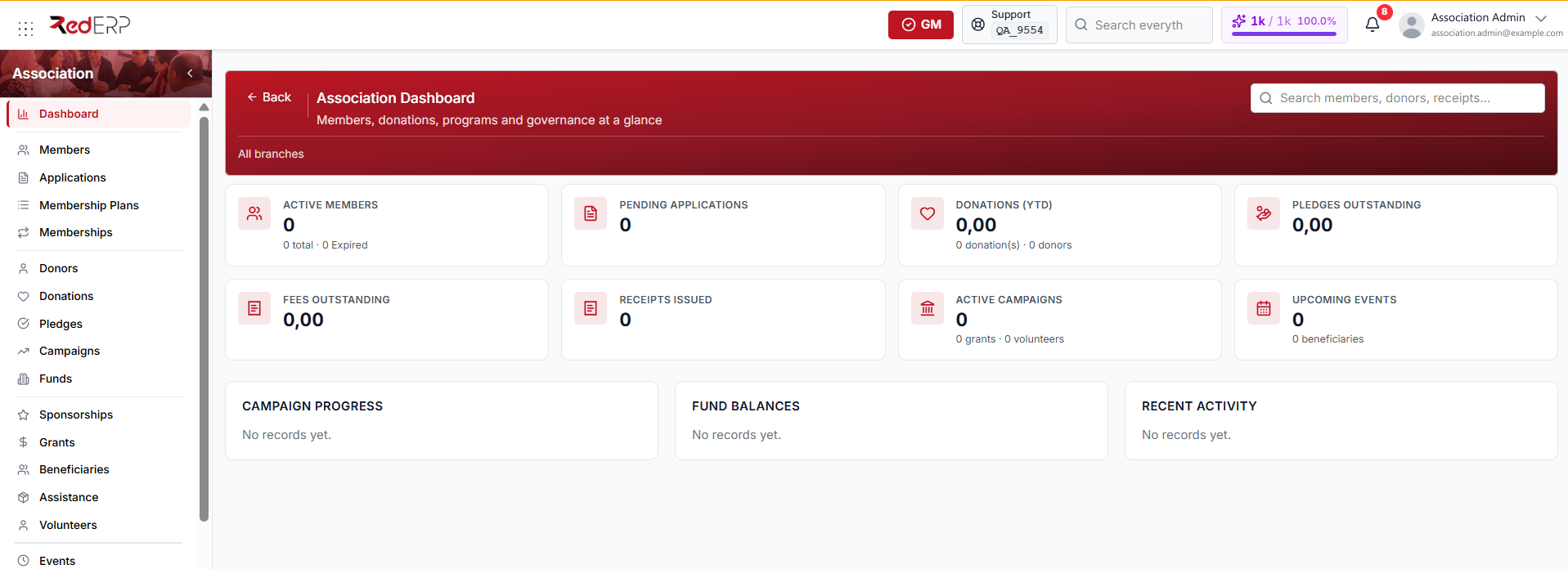
The dashboard gives an operational overview of:
- Active, total, and expired members
- Pending membership applications
- Year-to-date donations and donor count
- Outstanding pledges and membership fees
- Issued receipts
- Active campaigns, grants, volunteers, and upcoming events
- Campaign progress, fund balances, and recent activity
Use the global search to find members, donors, receipts, and related records. Enter at least two characters to start searching.
Sidebar sections
| Menu item | Path | Purpose |
|---|---|---|
| Association Dashboard | /modules/association | Review KPIs, upcoming work, balances, and recent activity |
| Members | /modules/association/members | Manage member profiles, status, membership dates, and wallets |
| Applications | /modules/association/applications | Review, approve, request information for, or reject applications |
| Membership Plans | /modules/association/plans | Define plan fees, billing frequency, eligibility, and benefits |
| Memberships | /modules/association/renewals | Generate fees, collect payments, and review renewals and expiries |
| Donors | /modules/association/donors | Maintain individual and organization donor profiles |
| Donations | /modules/association/donations | Record received contributions, allocations, payments, and refunds |
| Pledges | /modules/association/pledges | Track commitments, installment schedules, and collections |
| Campaigns | /modules/association/campaigns | Monitor fundraising targets, budgets, dates, and progress |
| Funds | /modules/association/funds | Manage restricted funds, balances, and transfers |
| Sponsorships | /modules/association/sponsorships | Track sponsor agreements, benefits, and received payments |
| Grants | /modules/association/grants | Follow grant funding, milestones, restrictions, and tranches |
| Beneficiaries | /modules/association/beneficiaries | Maintain beneficiary identity, eligibility, needs, and risk details |
| Assistance | /modules/association/assistance | Review, approve, and distribute assistance requests |
| Volunteers | /modules/association/volunteers | Manage volunteer profiles, skills, availability, and hours |
| Events | /modules/association/events | Plan events and manage registrations, fees, and attendance |
| Committees | /modules/association/committees | Create committees and assign member roles |
| Board | /modules/association/board | Maintain board positions, mandates, and voting rights |
| Meetings | /modules/association/meetings | Record agendas, attendance, quorum, minutes, and decisions |
| Resolutions | /modules/association/resolutions | Document formal resolutions, votes, owners, and progress |
| Elections | /modules/association/elections | Manage candidates, voting methods, results, and elected members |
| Receipts | /modules/association/receipts | Review, print, reprint, and cancel payment receipts |
| Reports | /modules/association/reports | Analyze membership, donations, funds, receipts, and volunteer hours |
| Compliance | /modules/association/compliance | Track obligations, due dates, reminders, status, and evidence |
| Cases | /modules/association/cases | Follow complaints, requests, suggestions, and disputes |
| Settings | /modules/association/settings | Configure the association profile, exercice, PoS sync, branches and units, and numbering |
Initial setup checklist
- Open Settings and complete the association profile.
- Add branches or units when the association operates in multiple locations.
- Create at least one Membership Plan.
- Add existing members or review submitted applications.
- Create funds and campaigns before recording restricted donations.
- Verify the default currency and receipt identity information.
- Record a test membership payment and donation.
- Print both receipt copies and verify their payer and payment details.
- Review reports and user permissions before daily operation.
Important concepts
- Applications and members are different records. Approval converts an eligible application into a member workflow.
- Plans, memberships, and fees are separate. Plans define terms; memberships connect members to plans; fees track amounts due and paid.
- Donations and pledges are different. A donation records money already received. A pledge is a commitment that can have installments.
- Campaigns and funds are optional allocations. Use them to track purpose, restrictions, targets, and balances.
- Receipts are generated by payment workflows. Keep cancelled receipts in the register for audit history.
- Governance records are connected. Committees, board members, meetings, resolutions, elections, and compliance should reflect the formal decision process.