Custom CSS
How to upload or link a CSS file and turn it on for the public storefront.
E-commerce → Storefront content → CSS adds one extra stylesheet on top of the live theme.
Open Storefront content, then click CSS (or /modules/ecommerce/content#css).
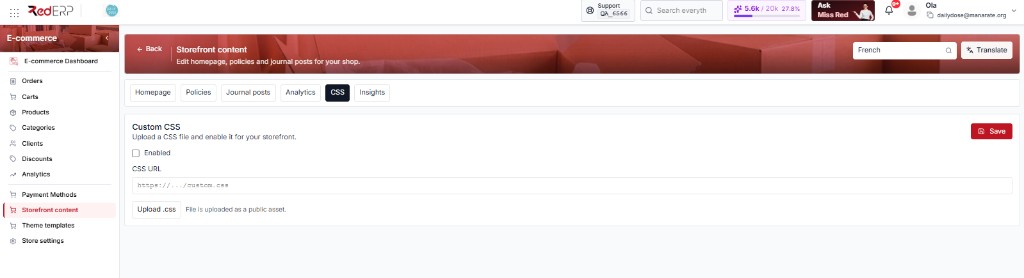
Title on the card: Custom CSS — Upload a CSS file and enable it for your storefront.
Use this for small tweaks (hide a bar, change a font size). For a new layout, use Theme Templates (Assign, import ZIP, or AI designer).
The screenshot is the default: Enabled off, CSS URL empty. In that state the shop uses the theme only — nothing extra.
This tab is store-wide. The language dropdown does not change CSS.
How to use this tab
Add the file
Either click Upload .css and pick a .css file, or paste a full URL in CSS URL (https://…/custom.css). Upload fills the URL for you. Hint under the button: File is uploaded as a public asset — anyone with the link can open the file.
Turn it on
Tick Enabled. If Enabled is off, the file can sit in CSS URL but the shop will not load it (same as the screenshot).
Save and check
Click the red Save. Open the storefront and hard-refresh (Ctrl+F5) so the browser does not keep old CSS. Inspect the page and confirm your stylesheet URL is in the HTML.
What each control does
| Control | How to use it |
|---|---|
| Enabled | Master switch. Off = theme only. On + Save = load CSS URL |
| CSS URL | The file the shop will request. Must be HTTPS (or the URL returned by Upload) |
| Upload .css | Sends the file to RedERP storage and pastes the public URL into CSS URL |
| Save | Writes Enabled + URL. Nothing changes on the shop until you Save |
To stop custom CSS without deleting the file: untick Enabled, Save. The URL stays so you can turn it back on later.
Safety
- Keep a copy of the
.csson your computer. A bad rule can hide Add to cart or break mobile. - Do not upload a huge framework here — that belongs in the theme.
- After a theme Assign / Reset, custom CSS still applies if Enabled is on. If the page looks wrong, turn Enabled off and Save, then fix the file.