Storefront Content
Edit homepage CMS, policies, journal posts, tracking tags, custom CSS, and traffic insights for the public shop.
E-commerce → Storefront content is the CMS for the public shop. Title: Storefront content — Edit homepage, policies and journal posts for your shop.
Path: /modules/ecommerce/content. This is not Theme templates (layout) and not Store Analytics (sales money).
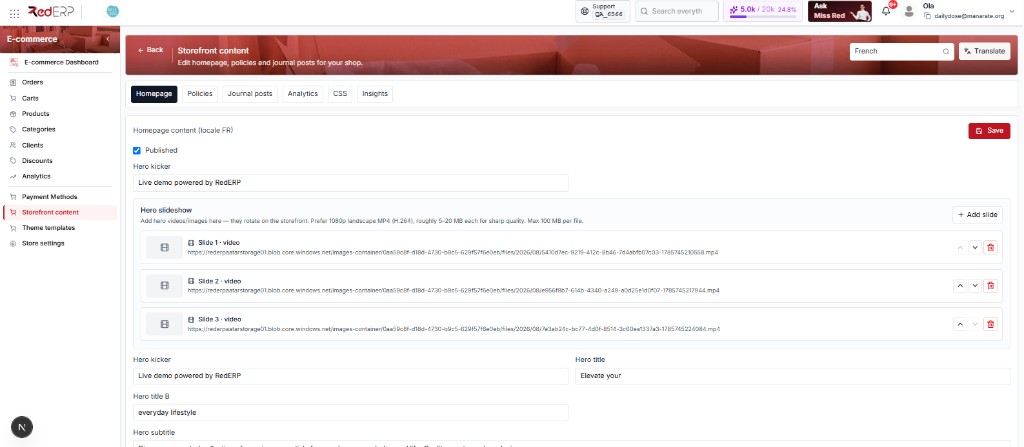
Tabs on the page (also in the URL hash): Homepage · Policies · Journal posts · Analytics · CSS · Insights
How to use each tab (with screenshots):
- Homepage — hero, slides, CTAs, SEO
- Policies — Privacy / Terms / Refunds
- Journal posts — create, publish, translate articles
- Tracking tags — GA4 / GTM / meta (not sales)
- Custom CSS — extra stylesheet
- Traffic insights — visits and funnel
- Translate — AI copy homepage, policies, and journal to another language
First tab
Hero, slideshow, CTAs, journal toggle, footer, and SEO for the selected language.
Legal pages
Privacy, Terms, and Refunds — kicker, title, and paragraphs per locale.
Editorial
Create, publish, and translate journal articles shown on the shop.
Head tags
GA4, GTM, and custom meta tags. Not sales KPIs.
Look
Enable a CSS file URL or upload a .css asset for the storefront.
Traffic
Pageviews, sessions, funnel, and top paths — not revenue.
AI
Copy homepage, policies, and journal posts from one language to another.
Language and Translate
Top right of every tab:
| Control | Role |
|---|---|
| Language dropdown | Edits that locale (English, French, Arabic, and many others) |
| Translate | Opens the modal — full how-to: Translate |
The heading on Homepage reads Homepage content (locale FR) when French is selected. Journal lists Locale FR the same way.
Save vs publish
| Control | Where | Meaning |
|---|---|---|
| Save (red) | Homepage, Policies, Analytics tags, CSS | Writes the form. Nothing goes live from Save alone if Published is off. |
| Published checkbox | Homepage, each policy page, each journal post | Unticked = draft on the public shop |
| Refresh | Policies | Reloads the selected policy from the server |
Always click Save after you edit. Changing locale without saving loses unsaved text.