Shipping Rules
How to add Standard, Express, and free-from-amount delivery options for checkout.
E-commerce → Store settings → Shipping rules is the list of delivery options shoppers pick at checkout.
Open Store settings, then Shipping rules (/modules/ecommerce/settings#shipping-rules).
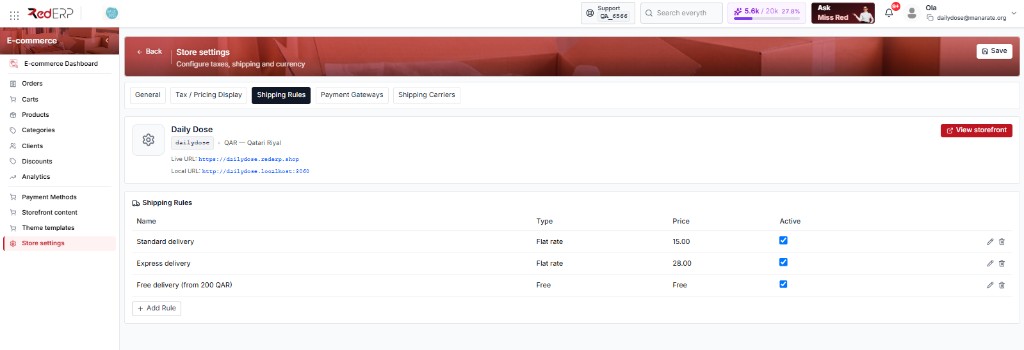
The table columns are Name, Type, Price, and Active. A new store shows No shipping rules yet. and + Add Rule.
Do not use the top-right Save for rules. Each rule has Save / Cancel on its own form.
You cannot delete or deactivate the last active rule. Keep at least one live option.
How to use this tab
Add a rule
Click + Add Rule. The form opens under the table.
Name it and pick a type
Name is required (example: Standard). Type:
| Type | What checkout does |
|---|---|
| flat_rate (default) | Charge a fixed Price (example: 15 QAR) |
| free | Free shipping when the cart reaches Min order amount (example: 200) |
| location_based | Price per ISO2 country (QA, TN, FR) |
Optional extras
Min days / Max days (estimate shown to the shopper). Applies to countries — ISO2, comma-separated (QA, AE). Invalid codes: Countries must be ISO 2-letter codes (e.g. TN, FR). Description. Tick Active.
Save the rule
Click Save on the form. The row appears. Pencil = edit, trash = delete, Active checkbox = turn off without deleting (unless it is the last active rule).
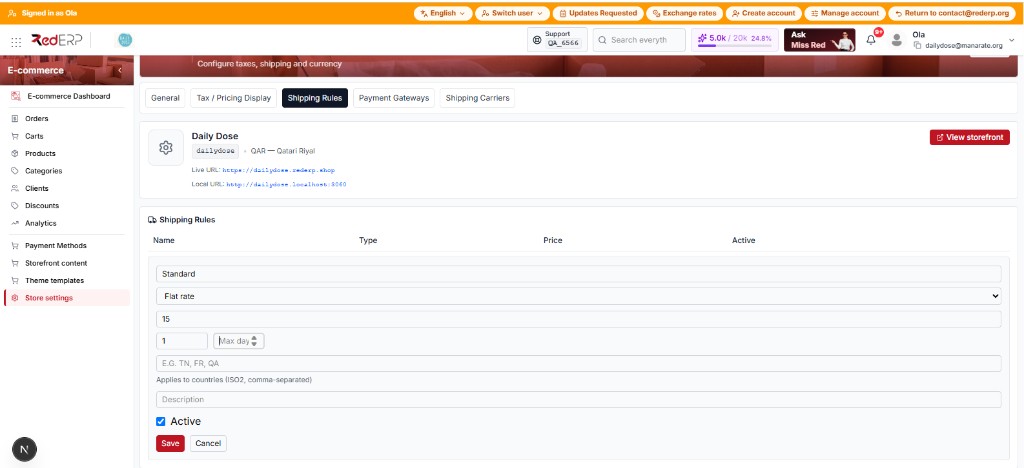
Typical Daily Dose set: Standard 15 · Express 28 · Free from 200.
What shoppers see
At checkout they choose one active rule. The chosen price is added to the order. If this list is empty, the shop falls back to Tax & pricing → Flat shipping rate. If that fallback is also 0 and there are no rules, they cannot place the order.