Subscriptions
Review CRM newsletter subscribers — frequency, interests, tags, and self-service links.
Overview
Use Newsletter Subscriptions for who opted in. This list is read-only. Do not send campaigns to unsubscribed addresses.
Newsletter Subscriptions
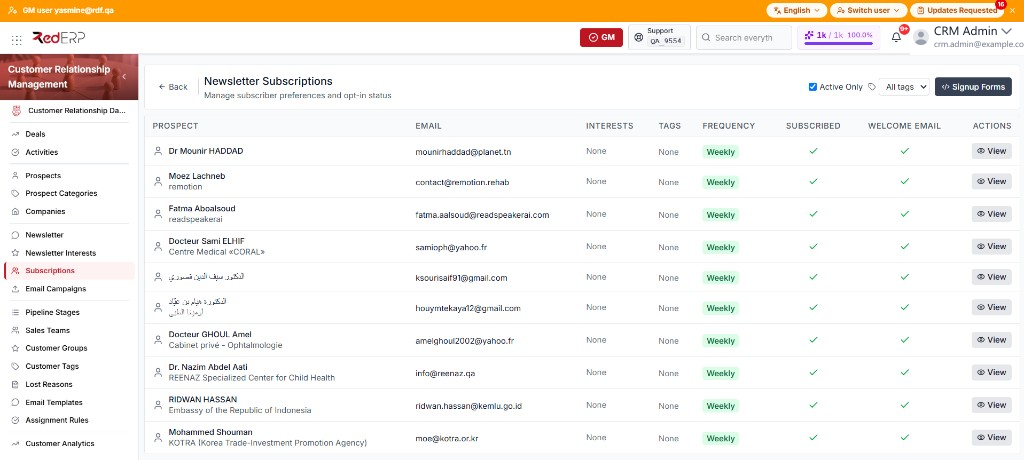
The columns are Prospect, Email, Interests, Tags, Frequency, Subscribed, Welcome Email, and Actions. Subscribed and Welcome Email show a check or an X, not a date. Empty interest and tag cells show None.
The row action is View. If the list is empty, the page shows No subscriptions found. Active Only is selected by default.
Review a subscription
- Open CRM → Subscriptions. The page title is Newsletter Subscriptions.
- Clear Active Only if you need unsubscribed rows.
- Use All tags to filter by source tag.
- Select View. The drawer title is the subscriber email.
- Review Prospect, Subscribed (Active or Unsubscribed), Frequency, Welcome Email (Yes with the sent date, or No), Subscribed at, Tags, Source form (or Added from CRM), and Interests. If the row is unsubscribed, also review Unsubscribed at.
- Under Newsletter links, use Copy or Open on the Unsubscribe link and Preferences link.
- In campaigns, use the placeholders
{{unsubscribe_url}},{{preferences_url}}, and{{email}}. - Select Signup Forms to manage embeddable forms. See Newsletter.
Frequencies: Daily, Weekly, Monthly, Immediate.
Good practice
- Honor frequency when you schedule Email Campaigns.
- Use form tags to target one platform without mailing everyone.