Policies
How to write and publish Privacy, Terms, and Refunds for each storefront language.
E-commerce → Storefront content → Policies is where you write the legal pages in the shop footer.
Open Storefront content, then click the Policies tab (or go to /modules/ecommerce/content#policies).
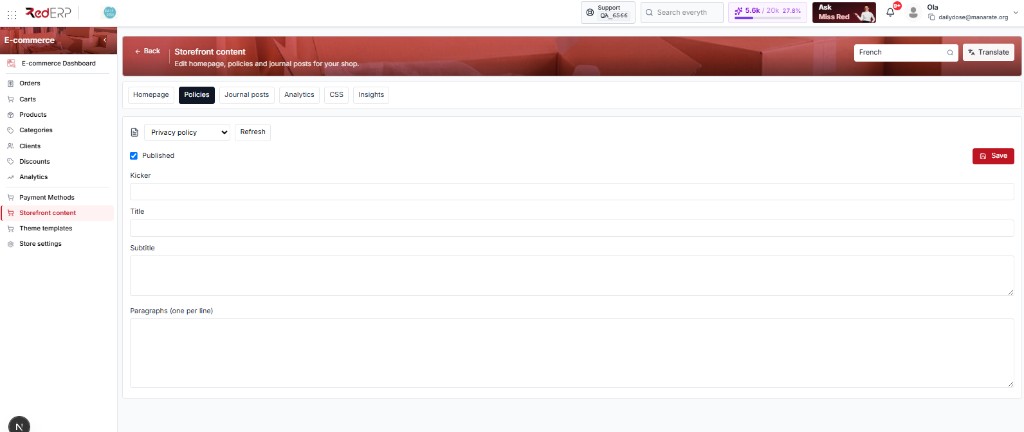
Shoppers open these URLs:
| Page in the dropdown | Shop URL |
|---|---|
| Privacy policy | /privacy (also /policies) |
| Terms & Conditions | /terms |
| Refund Policy | /refunds |
If Kicker / Title / Paragraphs are empty (as in the screenshot), the public page is almost blank. Fill them before you send customers there.
How to use this tab
Pick the language first
Top right: language dropdown (the screenshot shows French). You edit that language only. English Privacy and French Privacy are two different texts. Switch language, then look at the fields again — they will change.
Pick which policy
Under the tabs, the dropdown next to the document icon is Privacy policy / Terms & Conditions / Refund Policy. Change it, then click Refresh if the form still shows the previous page.
Write the page
Fill Kicker (small label above the title), Title (main heading), Subtitle (short intro), then Paragraphs (one per line). Each line you type becomes its own paragraph on the shop. There is no bold/italic editor — write plain text.
Publish and Save
Tick Published so this policy + this language is live. Click the red Save on the right. Unticked Published = draft; shoppers should not see it.
Do this three times (Privacy, then Terms, then Refunds) for each language you sell in. Saving Privacy does not save or publish Terms.
What each field is for
| Field | How to use it |
|---|---|
| Kicker | Optional eyebrow, e.g. Legal or Daily Dose |
| Title | What the shopper reads as the page name, e.g. Privacy policy |
| Subtitle | One or two sentences under the title (Last updated September 2026…) |
| Paragraphs (one per line) | The body. Press Enter for a new paragraph. Do not paste a whole Word document as one line. |
| Published | On = this locale’s page is public. Off = hidden/draft |
| Refresh | Reloads the saved text from the server (use if you switched policy and the form looks wrong) |
| Save | Writes this policy + this language. Always click it before you change language or leave |
Translate instead of typing twice
Use the Translate modal (top right, next to the language dropdown):
- Write and Save the English (or source) policies first, with Published on.
- Source = the language you just wrote. Target = e.g. French.
- Tick Homepage & policy pages (20 AI tokens per page). URLs stay as they are.
- Translate saves the target locale on the server. Review Privacy / Terms / Refunds in that language. Save again only if you edit by hand.
Do not ship raw AI for legal wording — have someone check Privacy / Refunds.
Check it on the shop
- Open the storefront (from Store Settings → View storefront, or
https://{handle}.rederp.shop). - Switch the shop language to the one you edited.
- Open
/privacy,/terms,/refundsfrom the footer. - If you still see the old text: hard-refresh, or confirm Published + Save for that locale.