Store Analytics
Review ecommerce sales KPIs (revenue, orders, AOV, top products/customers) in RedERP.
E-commerce → Analytics shows sales for a date range — not storefront traffic. Title: Analytics — Overview of revenue, orders and top products.
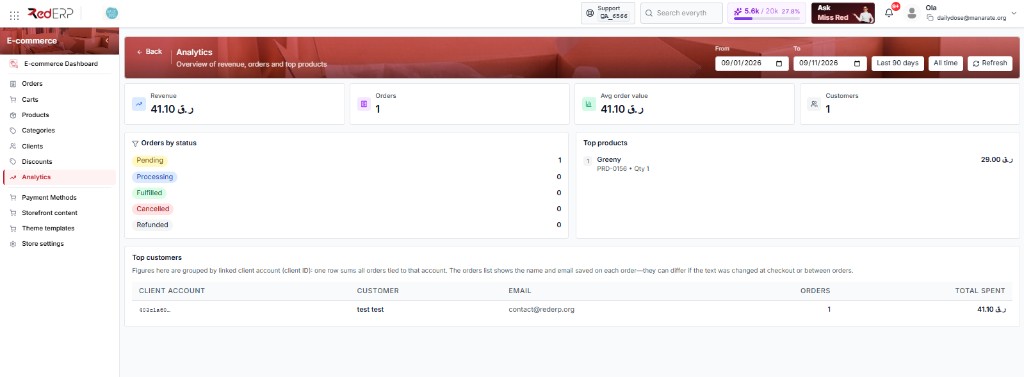
A new period with no sales shows 0 everywhere and empty states for top products and top customers. That is normal. Change the dates and click Refresh.
If you already have orders but every KPI is 0, the default range is month-to-date (first day of this month → today). Orders placed last month fall outside it — widen from / to and click Refresh.
Date range
Top right: from / to (example: 09/01/2026–09/08/2026) and Refresh. The default is month-to-date, not the last 30 days. Align the range with a campaign before you read the numbers.
KPI cards
| Card | Meaning |
|---|---|
| Revenue | Sales total in company currency (e.g. QAR) |
| Orders | Order count in the range |
| Avg order value | Revenue ÷ orders (0 when there are no orders) |
| Customers | Buyers counted for this range |
Orders by status
The left block lists Pending, Processing, Fulfilled, Cancelled, Refunded with a count each. On Orders the first three appear as New, Preparing, and Packed.
Top products
Best sellers by quantity and revenue. If nothing sold in the range: No product sales yet.
Top customers
The full-width block at the bottom groups figures by linked client account (client_id). One row sums all orders for that account. The orders list shows the name and email saved on each order — they can differ if the text was changed at checkout.
If nobody purchased in the range: No customer purchases in this period. Guest orders without a client may not appear here.
Analytics vs Insights
| Screen | Measures |
|---|---|
| Analytics (this page) | Orders, revenue, AOV |
| Content → Insights | Visits, sessions, funnel, top paths |
Use both when diagnosing cart → checkout drop-off.
Tips
- Cross-check top products with stock
- Check payment, shipping, and stock when conversion drops
- This page is sales only — traffic is on Insights