Production Fiche
Build reusable production fiches with materials and steps, import from BOM and routing, and activate recipes for production orders.
Overview
A Production Fiche is a reusable shop-floor recipe: planned materials, batch size, and step sequence. Use it to raise Production Orders quickly without re-entering the same structure each time.
Production Fiche list
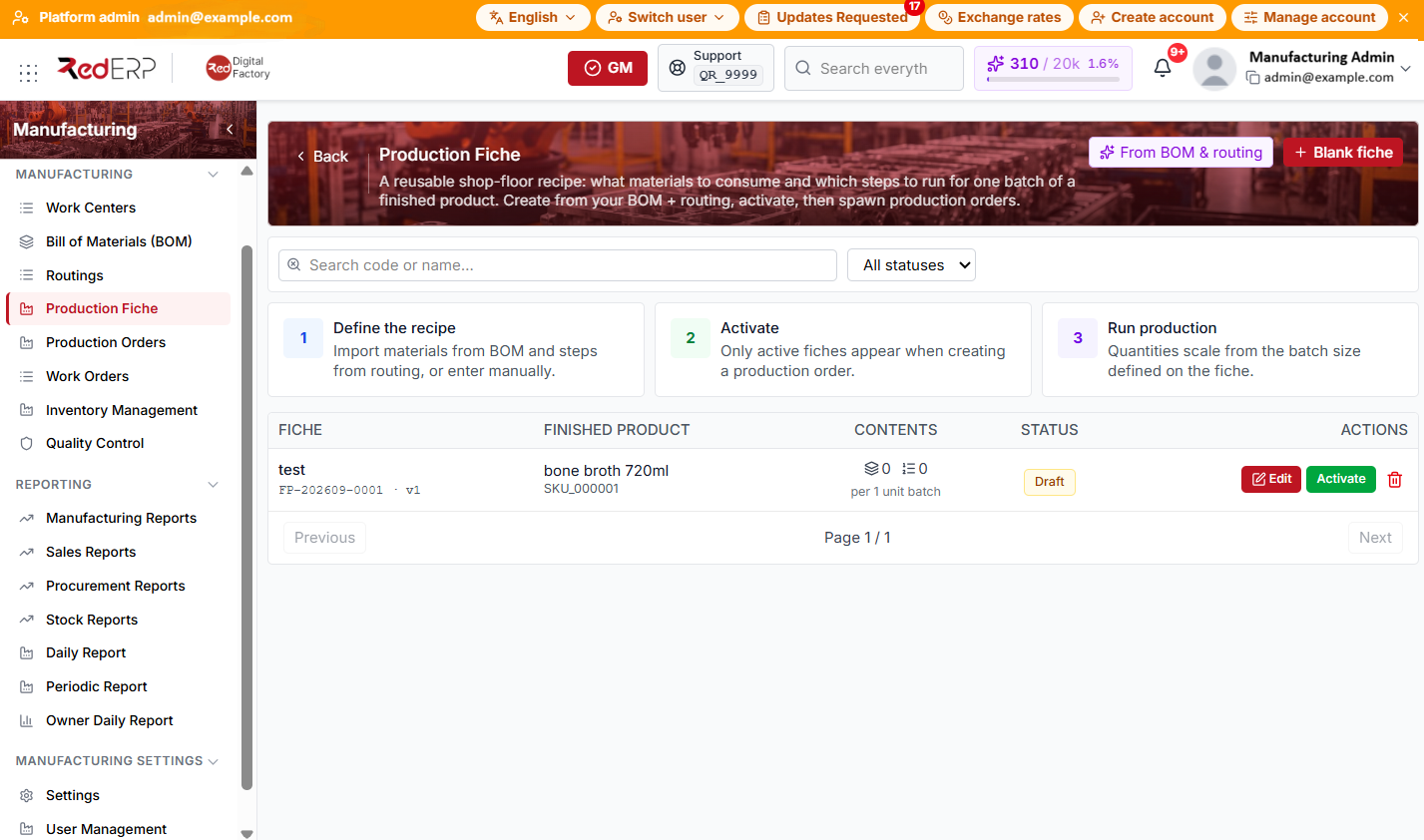
The columns are Fiche (name, code, version), Finished product, Contents (material and step counts, batch size), Status, and Actions.
The list page also shows a three-step guide: Define the recipe, Activate, and Run production.
Header actions (when permitted): From BOM & routing and Blank fiche.
Use Search code or name… and the All statuses dropdown to filter the list.
Create from BOM and routing
- Open Manufacturing → Production Fiche.
- Select From BOM & routing (header) or Create from BOM & routing (empty state).
- RedERP opens the New production fiche page with the Quick start — import from BOM & routing panel.
- Choose Finished product, then Preview import or Create draft in one click.
- Materials come from the BOM (with stages); steps come from routing operations. Adjust quantities and steps before saving.
Create a blank fiche
- Select Blank fiche on the list page.
- RedERP opens the New production fiche editor.
- Enter Fiche name, Finished product, Batch size (output qty), and Unit.
- In Process flow, add steps (Seq, Step, Work center, Min) with Add step.
- In Materials, add lines (Seq, Stage, Component, Qty, Unit) with Add material.
- Select Create fiche.
View, edit, activate, or archive
- Click a row to open the fiche detail page in read-only mode.
- Edit — opens the fiche detail page in edit mode.
- Activate — shown for Draft fiches only; makes the fiche selectable on new production orders.
- Archive — shown for Active fiches only.
- Delete — trash icon on the row; confirm in the dialog.
On the detail page, use Edit then Save changes, or Activate fiche when the recipe is ready.
Fiche statuses
- Draft — editable; not usable for new production orders
- Active — selectable when creating production orders
- Archived — kept for history; not offered on create
There is no Inactive status on production fiches (unlike BOM or routings).
Good practice
- Standardize Batch size (output qty) to match how the line actually runs; material quantities and step times rescale when batch size changes.
- Start with From BOM & routing, then tweak only what differs on the floor.
- Archive superseded fiches instead of deleting them when past orders reference them.