Documents & Payments
Delivery notes and invoices side by side with the payments recorded against them — amount, method and payment date — with totals by method and what remains to collect.
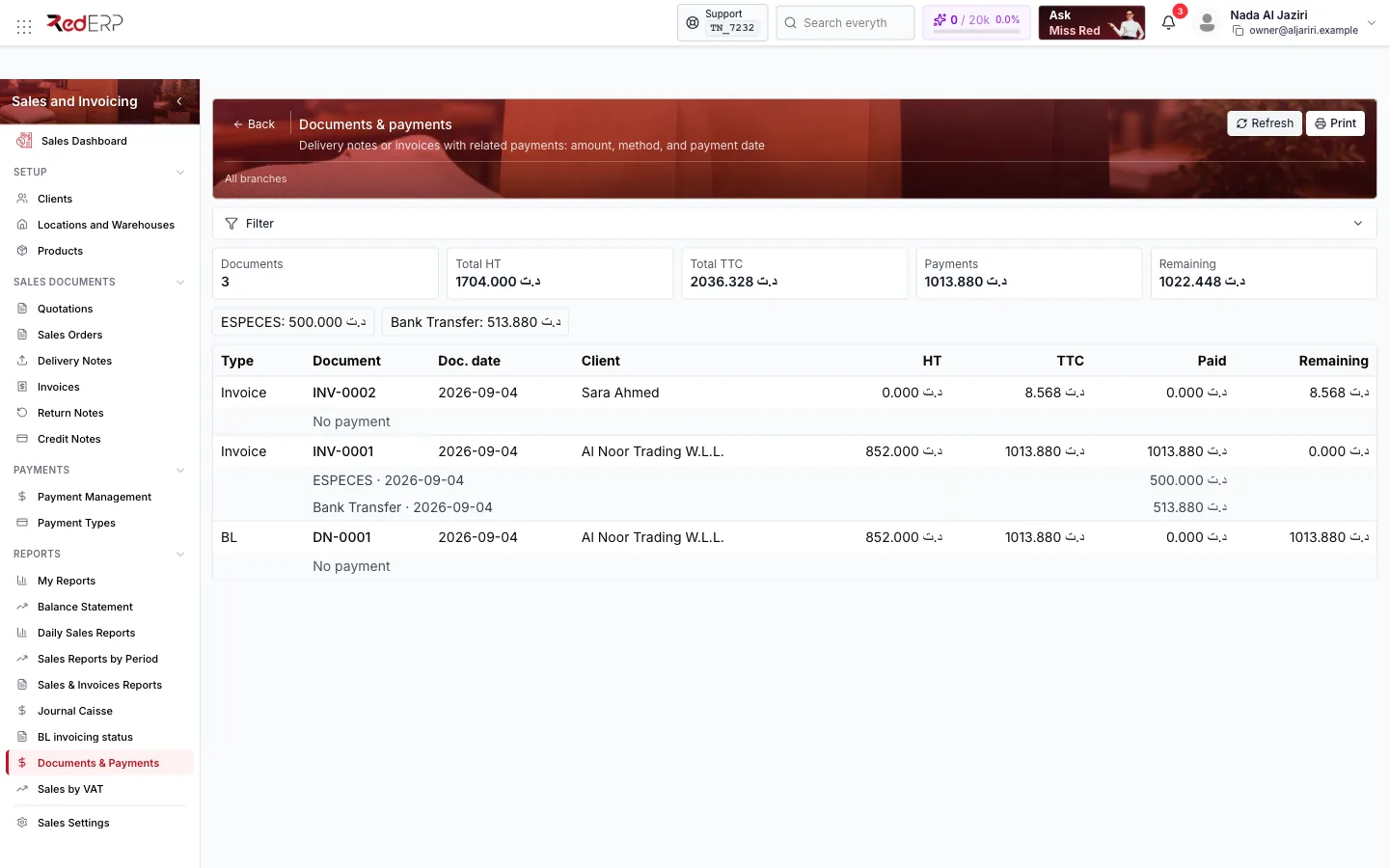
Documents & payments shows, for a period, every delivery note and invoice with its payments: how much was paid, by which method and when, and what remains. It is the bridge between the sales documents and the cash actually received.
Screen tour
| Area | What it shows |
|---|---|
| Header | Refresh, Print, Filter (dates, client, document type) |
| KPI cards | Documents, Total HT, Total TTC, Payments, Remaining, then one total per payment method |
| Table | Type (Invoice or BL), Document, Doc. date, Client, HT, TTC, Paid, Remaining; under each document the payments (method · date · amount) or No payment |
How to use it
- Sort out Remaining amounts to chase: an invoice with No payment or a partial payment is a collection action.
- Compare method totals with the bank and cash: the Bank Transfer total should match the transfers received on the account for the period.
- Print it as the supporting document for the accountant's revenue and receivables reconciliation.
Logic and rules
- Only Completed payments are listed and summed.
- A delivery note transferred to an invoice keeps its own line: payments taken on delivery stay on the note, later payments on the invoice — read both lines together for the full picture of a sale.
- Remaining = TTC − Paid for each document.