Translate
How to use the Translate storefront content modal — source, target, scope, tokens, and review.
Translate is the white button next to the language dropdown on every Storefront content tab (Homepage, Policies, Journal, Analytics, CSS, Insights). It opens the modal Translate storefront content.
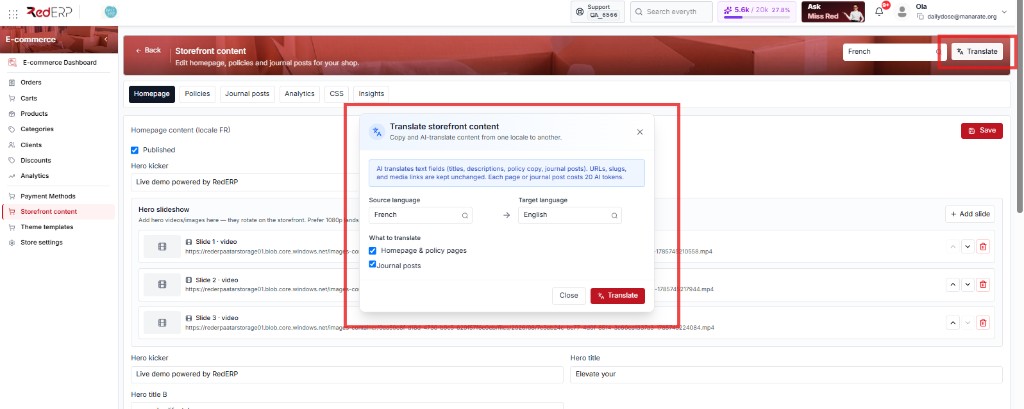
Subtitle: Copy and AI-translate content from one locale to another.
This is not the language dropdown. The dropdown only edits one locale. Translate copies + AI-fills another locale and saves it on the server (you do not click the red Save for this).
| Control on the modal | What it does |
|---|---|
| Title | Translate storefront content |
| Subtitle | Copy and AI-translate content from one locale to another. |
| Blue note | What AI changes vs what stays (URLs, slugs, media) and the 20 tokens cost |
| Source language | Language to copy from (defaults to the tab you were editing) |
| Target language | Language to fill (defaults to French if source is English, otherwise English) |
| Homepage & policy pages | Home + Privacy + Terms + Refunds |
| Journal posts | Every journal post in the source locale |
| Close | Cancel without running |
| Red Translate | Starts the run |
Before you click Translate
- Finish the source language first (usually English).
- On Homepage and Policies, click Save and tick Published if those pages should stay live.
- On Journal, publish the posts you want copied.
- Check the purple token counter in the ERP header. You need 20 tokens per source page + per source journal post in this run.
If the source locale has no homepage/policies and no posts, you get No content found for the source locale.
How to use the modal
Open it
On E-commerce → Storefront content, click Translate (top right, next to French / English / …).
Read the blue note
AI translates text fields (titles, descriptions, policy copy, journal posts). URLs, slugs, and media links are kept unchanged. Each page or journal post costs 20 AI tokens.
Pick Source language
Defaults to the locale you were editing. Example: you were on French → source starts as French. Change it to English if that is the finished text.
Pick Target language
The language to fill. If source is English, target defaults to French. Source and target must be different — same language shows Source and target language must be different.
Choose What to translate
Both boxes start on:
| Checkbox | What is copied |
|---|---|
| Homepage & policy pages | Home + Privacy + Terms + Refunds for that source locale |
| Journal posts | Every journal post in the source locale (same slugs, new titles/body) |
Untick one to save tokens. If both are off: Select at least pages or journal posts to translate.
Run Translate
Click the red Translate in the modal footer. The form is replaced by Translating content… this may take a minute. Close (X) is disabled while it runs.
On success the modal closes. A green banner: Translated N page(s) and M post(s) to FR. The language dropdown switches to the target so you can review immediately.
What is copied vs left alone
| Copied / translated | Left unchanged |
|---|---|
| Homepage hero titles, subtitle, CTAs, chips, footer, SEO text | Slide / image / video URLs |
| Policy kicker, title, subtitle, paragraphs | Policy URLs (/privacy, /terms, /refunds) |
| Journal title, excerpt, deck, category, sections | Slug, cover image URL |
| Published flag from the source | Analytics tags, CSS, Insights (not in this modal) |
If French already exists, Translate overwrites that French text with a new AI version. Review before you run it again.
Tokens
| Cost | 20 × (number of source pages in the run + number of source posts in the run) |
| Example | Home + 3 policies + 4 journal posts = 8 × 20 = 160 tokens |
| Too few | Not enough AI tokens. Translation requires X tokens; you have Y remaining. Buy / wait for quota. |
| Header | The 5.6k / 20k style counter is the same AI pool |
Untick Journal posts if you only need legal pages.
Errors
| Message | What to do |
|---|---|
| Source and target language must be different. | Change one dropdown |
| Select at least pages or journal posts to translate. | Tick a scope |
| No content found for the source locale | Save content in the source language first |
| Translation timed out… | Untick journal, or translate fewer posts |
| AI translator is currently unavailable. | Try later |
| Translation failed. Try again. | Retry; check the network |
After it finishes
- You are now on the target locale.
- Open Homepage — check titles and CTAs. Save only if you edit by hand.
- Open Policies — each of the three pages. Fix legal wording (do not ship raw AI for Privacy / Refunds).
- Open Journal posts — Edit a couple of rows. Slugs stay English-style (
a-quiet-home-perfectly-lit); titles should be in the target language. - Confirm Published is still what you want (it was copied from the source).
- On the public shop, switch language and open
/,/privacy,/journal.
Close in the modal footer (or X) cancels without running.