Online Customers
Manage clients used by RedERP ecommerce (shared with Data → Clients).
E-commerce → Clients opens the shared Clients module — the same records as Data Management → Clients, with ecommerce back links. Title: Clients — Manage your client relationships and information.
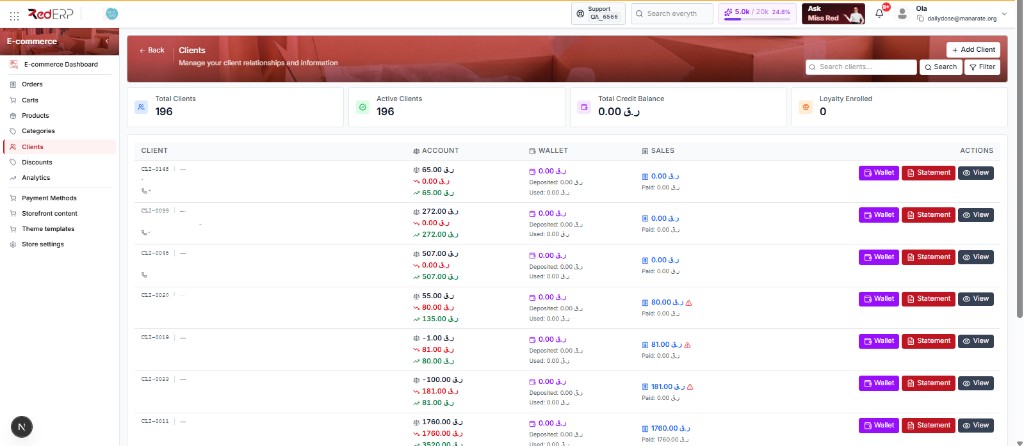
This is not an ecommerce-only table. Changes here affect CRM / clients everywhere.
The clients list
| Control | What it does |
|---|---|
| + Add Client | Create a client (drawer) |
| Search | Find by name, code, or email |
| Filter | Narrow the list |
Four summary cards sit above the table (example from Daily Dose):
| Card | Meaning |
|---|---|
| Total Clients | All client records (e.g. 196) |
| Active Clients | Currently active |
| Total Credit Balance | Company-currency credit (e.g. QAR) |
| Loyalty Enrolled | Clients in loyalty when that feature is on |
Table columns
| Column | What you see |
|---|---|
| Client | Code (e.g. CLI-0145), name, phone |
| Account | Credit / pending / related balances |
| Wallet | Wallet total, deposited, used |
| Sales | Sales totals (caution icon when something needs review) |
| Actions | Wallet, Statement, View |
Click View for the profile, addresses, and related activity used at checkout.
Notes
- Guest checkout can create an order with an email but no
client_id. Those shoppers may not appear as a row until someone creates a client. - Storefront registration and forgot-password use the customer email on the shop.
- Use this page for shopper profiles, credit / loyalty when enabled, and checkout addresses.