Discounts
Create and manage ecommerce promo codes for carts and checkout in RedERP.
E-commerce → Discounts defines promo codes for carts and checkout. Title: Discounts — Create promo codes and campaigns.
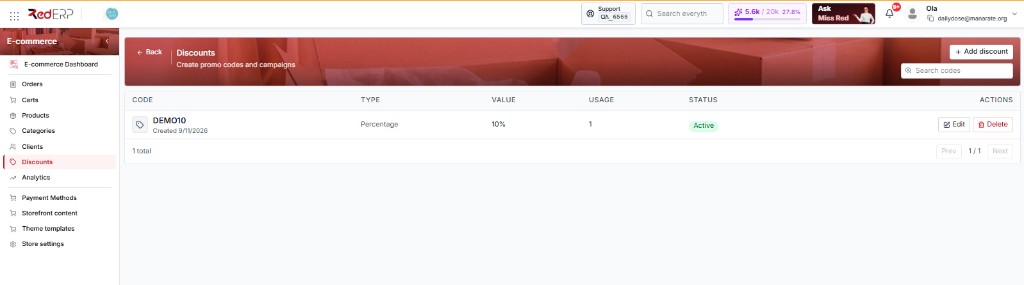
A new store shows No discounts found. That is normal until you add a code.
The discounts list
| Control | What it does |
|---|---|
| + Add discount | Opens the create drawer |
| Search codes | Find by code name |
Table columns
| Column | What you see |
|---|---|
| Code | Promo string, stored in uppercase |
| Type | Percentage or fixed |
| Value | % or a money amount |
| Usage | How many times it has been used |
| Status | Active or not |
| Actions | Edit / delete |
Create a discount
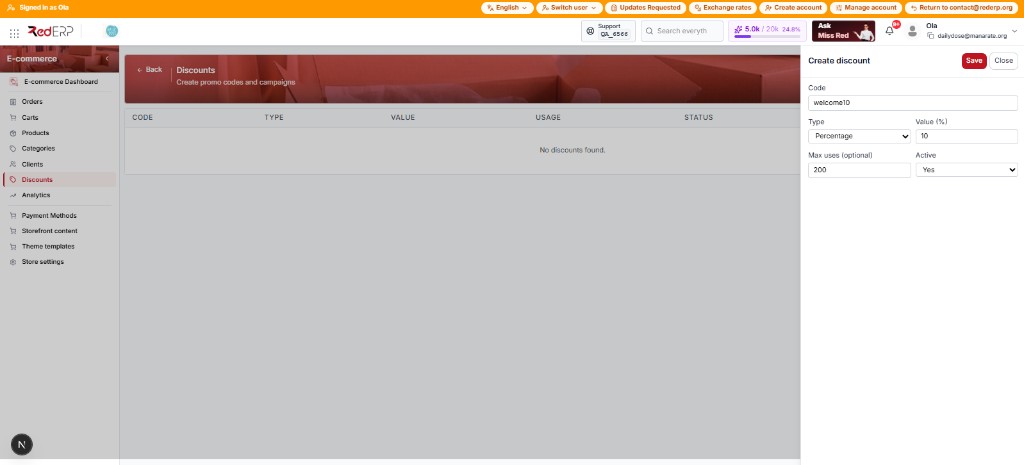
Open the form
Click + Add discount. The drawer slides in from the right with Save and Close. Title: Create discount. Example filled: code welcome10 (stored as WELCOME10), Percentage, value 10, max uses 200, Active Yes.
Enter the code
Type a Code (placeholder WELCOME10). It is stored uppercase.
Type and value
Type is Percentage or Fixed. Value for percentage must be 0–100.
Limits and Active
Optional Max uses (e.g. 100). Set Active to Yes. Click Save.
On the detail page you can set starts_at / ends_at if the list create form omitted dates.
Operate
- Toggle Active without deleting
- Edit value or limits on the detail page
- Delete obsolete codes
- Test the code on the storefront or via Carts
Inactive or expired codes will not apply.