General
How to set store name, handle, filters, logo, social links, emails, and abandoned-cart recovery.
E-commerce → Store settings → General is the identity of the public shop.
Open Store settings (last item in the ecommerce sidebar). The General tab is selected by default (/modules/ecommerce/settings#general).
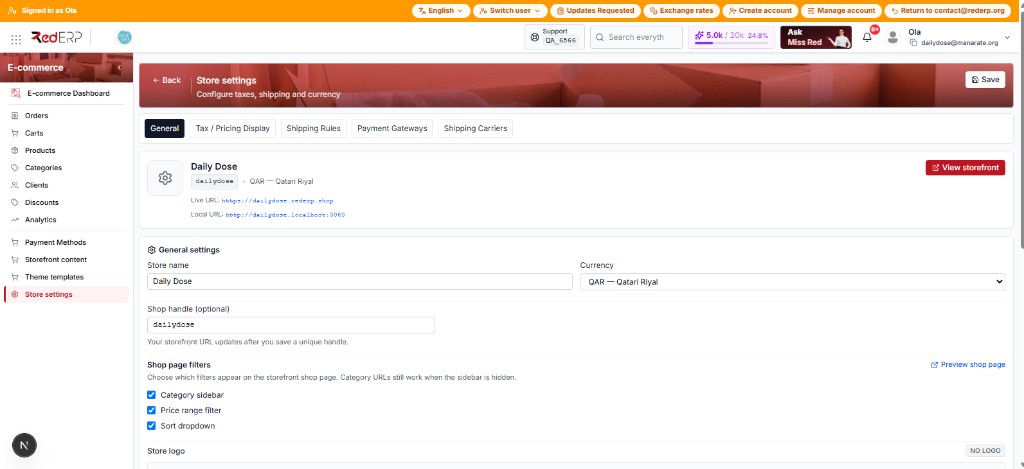
Always click the red Save at the top right of the page after you change this tab. Save needs both Store name and Shop handle — otherwise you get Store name and domain are required.
How to use this tab
Set the name and currency
Store name appears on the shop and in emails (example: Daily Dose). Currency is USD, EUR, GBP, TND, QAR, or AED — this is the money shoppers see.
Set the shop handle
Shop handle is the public slug (dailydose). After a successful Save, the live shop is https://{handle}.rederp.shop. The hint under the field: Your storefront URL updates after you save a unique handle. If you type a new handle and have not saved, the amber note says the preview links still use the old handle.
Choose shop page filters
Tick Category sidebar, Price range filter, and/or Sort dropdown. Category URLs still work if the sidebar is off. If all three are off, shoppers see a clean product grid. After changing filters, Save, then refresh /shop. Use Preview shop page (opens a new tab) to check.
Save
Click Save. Then use View storefront or Live URL on the preview card — those links update only after Save.
| Field | How to use it |
|---|---|
| Store name | Header, emails, preview card |
| Currency | All storefront prices |
| Shop handle | Subdomain. Change carefully — old links break |
| Category sidebar | Filter by category on /shop |
| Price range filter | Min / max price on /shop |
| Sort dropdown | Sort control on /shop |
Logo, social, emails (same tab — scroll down)
Upload a logo
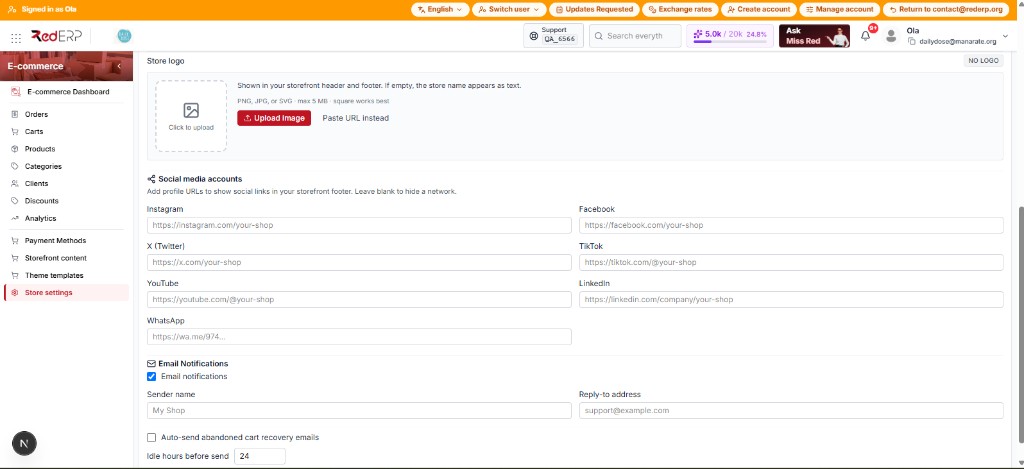
Click the dashed square or Upload Image (PNG, JPG, or SVG, max 5 MB — square works best). Or Paste URL instead. Empty = store name as text and a NO LOGO / No logo badge. Hover the preview to Replace.
Add social accounts
Paste profile URLs for Instagram, Facebook, X, TikTok, YouTube, LinkedIn, WhatsApp. They show in the storefront footer. Leave a field blank to hide that network.
Turn on shop emails
Tick Email notifications. Set Sender name (falls back to store name) and Reply-to address (falls back to the account email). Replace placeholders such as support@example.com with a real inbox. Reply-to is required for the contact form.
Optional: abandoned-cart recovery
Tick Auto-send abandoned cart recovery emails. Set Idle hours before send (1–168, default 24). This stays off until Email notifications is on. Staff can still click Send recovery on Carts. The cart needs a customer email.
Shoppers open recovery links as /cart?recover=TOKEN or /checkout?recover=TOKEN. Full email list: Ecommerce Emails.