Newsletter
Review CRM newsletter totals and open interests, subscriptions, campaigns, and signup forms.
Overview
Use the Newsletter Dashboard as the home of outreach. Interests, subscriptions, signup forms, and campaigns are separate records.
Newsletter dashboard
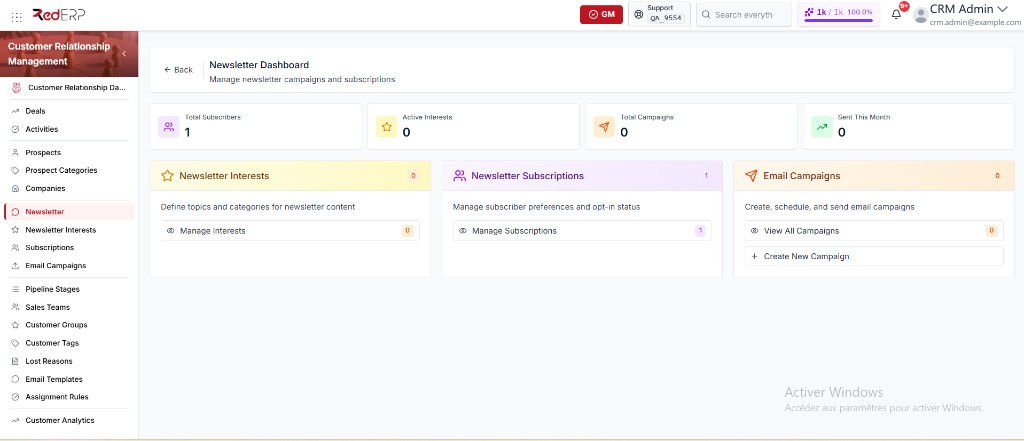
- Open CRM → Newsletter. The path is
/modules/crm/newsletter. The page title is Newsletter Dashboard. - Review Total Subscribers, Active Interests, Total Campaigns, and Sent This Month.
- Use the three cards:
- Newsletter Interests — Manage Interests opens Newsletter Interests.
- Newsletter Subscriptions — Manage Subscriptions opens Subscriptions.
- Email Campaigns — View All Campaigns opens the list; Create New Campaign opens the same list with
?create=true.
Signup forms
Signup forms are not in the CRM sidebar. Open them from Subscriptions → Signup Forms. The path is /modules/crm/newsletter/forms.
The columns are Name, Platform, Tags, Status, Subscribers, and Public key. The subscribers cell also shows a submissions count. If the list is empty, the page shows No signup forms yet. Create one per website or platform.
Create a form
- Open CRM → Subscriptions.
- Select Signup Forms.
- Select Add Form. The drawer title is New signup form.
- Enter the required Form name.
- Add at least one Source tag (required). Press Enter after each tag.
- Set Platform (Website, Landing page, Blog, eCommerce store, Mobile app, Social media, or Other). The default is Website.
- Add Default interests if needed. Leave empty to use the account defaults.
- Set Frequency (Daily, Weekly, Monthly, or Immediate). The default is Weekly.
- Set Status (Active or Inactive), Send welcome email to new subscribers, Success message, and Allowed origins as needed.
- Select Create Form.
Embed a form
- Open CRM → Subscriptions → Signup Forms.
- Select View on the row. The drawer includes Embed on your website.
- Copy the Public key, or select Regenerate key then Yes, regenerate if the old key must be retired.
- Copy the Subscribe endpoint (POST JSON:
{ email }). - Select Copy snippet for the HTML + JavaScript snippet and paste it on the website. The snippet includes a honeypot field.
Use one form per platform so tags stay meaningful on Subscriptions.
Good practice
- Create interests before you build forms and campaigns.
- Do not regenerate a public key while a live site still uses the old key.