About Shopify
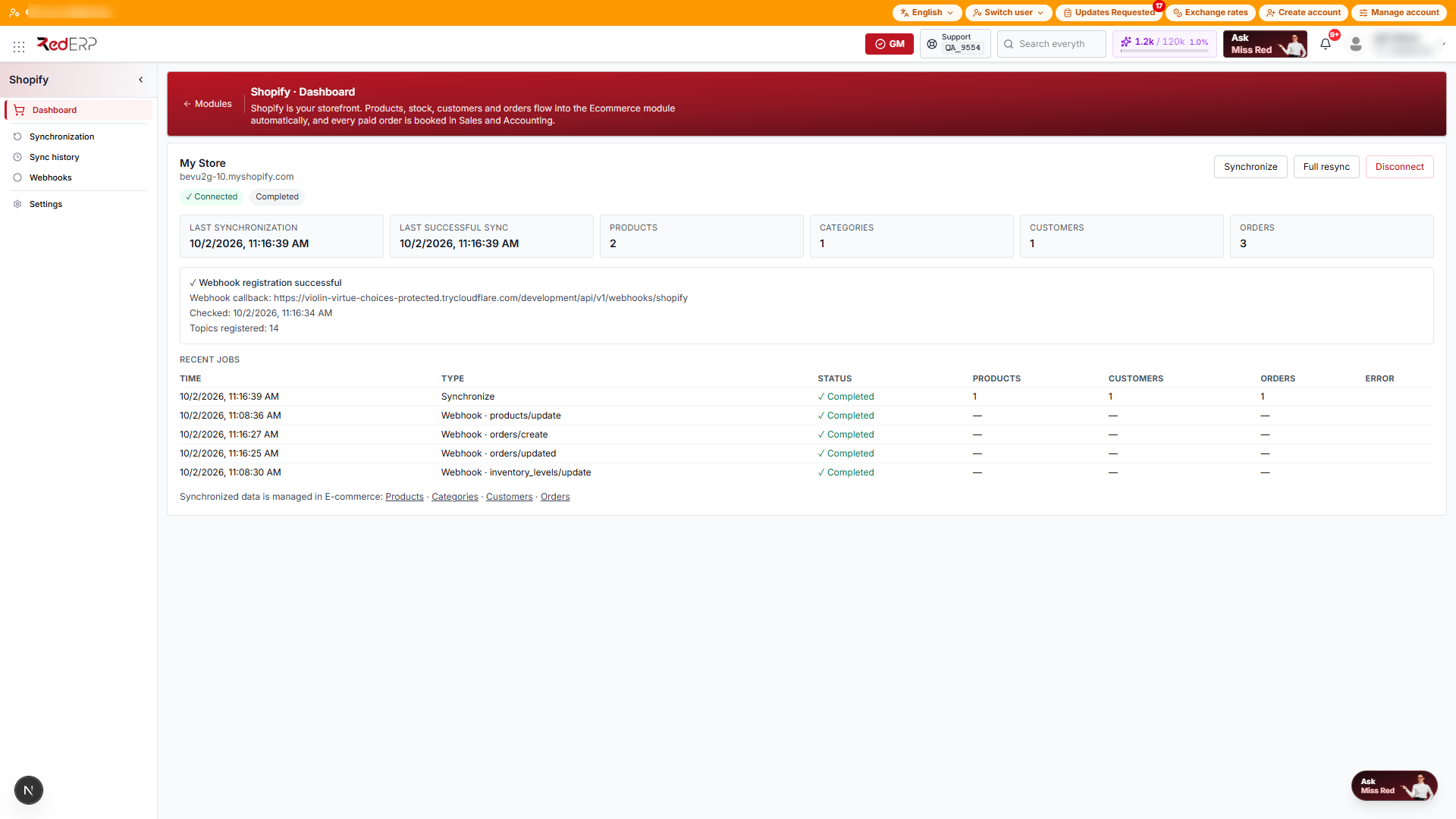
Connect a Shopify store to RedERP. Products, stock, customers and orders flow into E-commerce automatically, and every paid order is booked in Sales and Accounting.
At a glance
| Property | Value |
|---|---|
| Category | Integration |
| Plan | Activate from Profile menu → App marketplace; availability depends on your plan |
| Status | Available |
| Open it | Module launcher → Shopify, or rederp.ai/modules/shopify |
| Direction | One way: Shopify → RedERP. RedERP never writes back to your store. |
What you can do
- Connect one or several Shopify stores to a RedERP account
- Import products, variants, categories, stock levels, customers and orders
- Receive every new order, payment, refund, cancellation and stock change in real time (webhooks)
- Turn each paid Shopify order into a sales order, an invoice, a payment and ledger entries — automatically
- Follow synchronisation history, webhook health and the last error from one control centre
Where is the data?:
The Shopify module is the integration control centre only. Synchronised products, categories, clients and orders are managed in E-commerce (with a Shopify badge), sales documents in Sales & Invoicing and payments in Accounting. There are no separate "Shopify products" or "Shopify orders" pages.
How it works
Connect
Enter your *.myshopify.com domain in Shopify → Dashboard and approve RedERP on Shopify's authorization page. See Connect your store.
First import
RedERP imports locations, products and variants, categories, stock, customers and orders. The job appears in Sync history. See Synchronisation.
Stay live
Webhooks push every change the moment it happens. A manual Synchronize picks up anything missed. See Webhooks & troubleshooting.
Paid orders are booked
Order → E-commerce order SHP-#### → Sales order → Invoice SHPINV-#### → Payment → Ledger. See Orders & accounting.
Sidebar
| Menu item | Path | Purpose |
|---|---|---|
| Dashboard | /modules/shopify | Connection status, store info, counts, webhook health, recent jobs, connect / disconnect |
| Synchronization | /modules/shopify/sync | Synchronize, Full resync, last sync and last successful sync |
| Sync history | /modules/shopify/history | Every job: time, type, status, products / customers / orders, error |
| Webhooks | /modules/shopify/webhooks | Registration status, callback URL, topics found and missing |
| Settings | /modules/shopify/settings | Optional accounting overrides (stock location, receivables ledger, bank ledger) |
Related
- E-commerce — where Shopify products, clients and orders appear
- Online Orders — the three status axes of an order
- Sales & Invoicing — sales orders, invoices and payments created by the integration
- Third-Party Integration — other connected applications