Customer Analytics
Review pipeline by stage, win/loss, forecast, salesperson performance, and lead sources for a date range.
Overview
Use Customer Analytics to review pipeline health. The screen subtitle is Pipeline, forecast, win/loss, salesperson performance & lead sources. This page does not replace Sales & Invoicing reports.
Customer Analytics
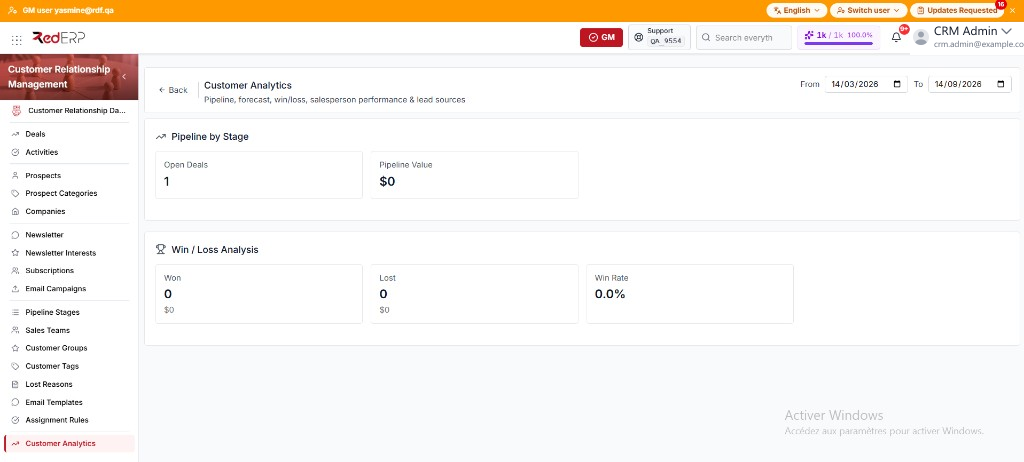
- Open CRM → Customer Analytics.
- Set From and To. The default range is the last six months through today.
- Review the sections that have data for that range.
Pipeline by Stage shows Open Deals and Pipeline Value (as $0 when the value is zero). A Deals bar chart per stage appears when stages have counts.
Win / Loss Analysis shows Won and Lost (count, with revenue underneath) and Win Rate. A pie for Won, Lost, and Open appears when at least one of those counts is greater than zero.
Revenue Forecast appears when monthly forecast data exists. It shows Total forecast, then bars for Weighted Forecast and Total Revenue.
Salesperson Performance appears when salesperson rows exist. The columns are User, Open, Won, Lost, Win Rate, Won Revenue, and Avg Deal. An empty user shows an em dash.
Lead Source / UTM Attribution appears when source rows exist. The columns are Source, Total, Won, Lost, Win Rate, and Revenue. An empty source shows Direct.
If no section has data, the page shows No analytics data available for the selected period.
Good practice
- Close deals as Won or Lost so Win Rate is meaningful.
- Compare the same From / To range when you review two periods.