About Human Resources
Human Resources in RedERP: the dashboard, employees, contracts, leave, payroll, expenses, skills, appraisals, recruitment, and reports.
Overview
The Human Resources module brings people records, contracts, time off, attendance, payroll, expenses, skills, appraisals, training, and hiring into one workspace.
Open Human Resources from the module launcher or the main sidebar, or go to rederp.ai/modules/hr. The first screen is the HR Dashboard — Workforce, time off, payroll and hiring. The path is /modules/hr.
Jobs and applications on Recruitment, Job Openings, and Applications are the same records as the Job Application Portal.
How records connect
| Record | What it is | Next step |
|---|---|---|
| Employee | A person record | Add a contract, allocate leave, record attendance |
| Department | A team grouping | Assign employees |
| Contract | Wage, dates, and state | Keep it Open for a payroll compute |
| Leave request | Time off against an allocation | Approve when the balance allows |
| Payroll run | A period to compute | Compute, then Validate |
| Expense | An individual claim | Submit, approve, or group it on an expense sheet |
| Job opening / application | A vacancy and a candidate | Shared with the Job Application Portal |
A payroll compute uses Open contracts. Leave requests use Leave Types and Leave Allocations. Hiring records are shared with Job Application.
Dashboard
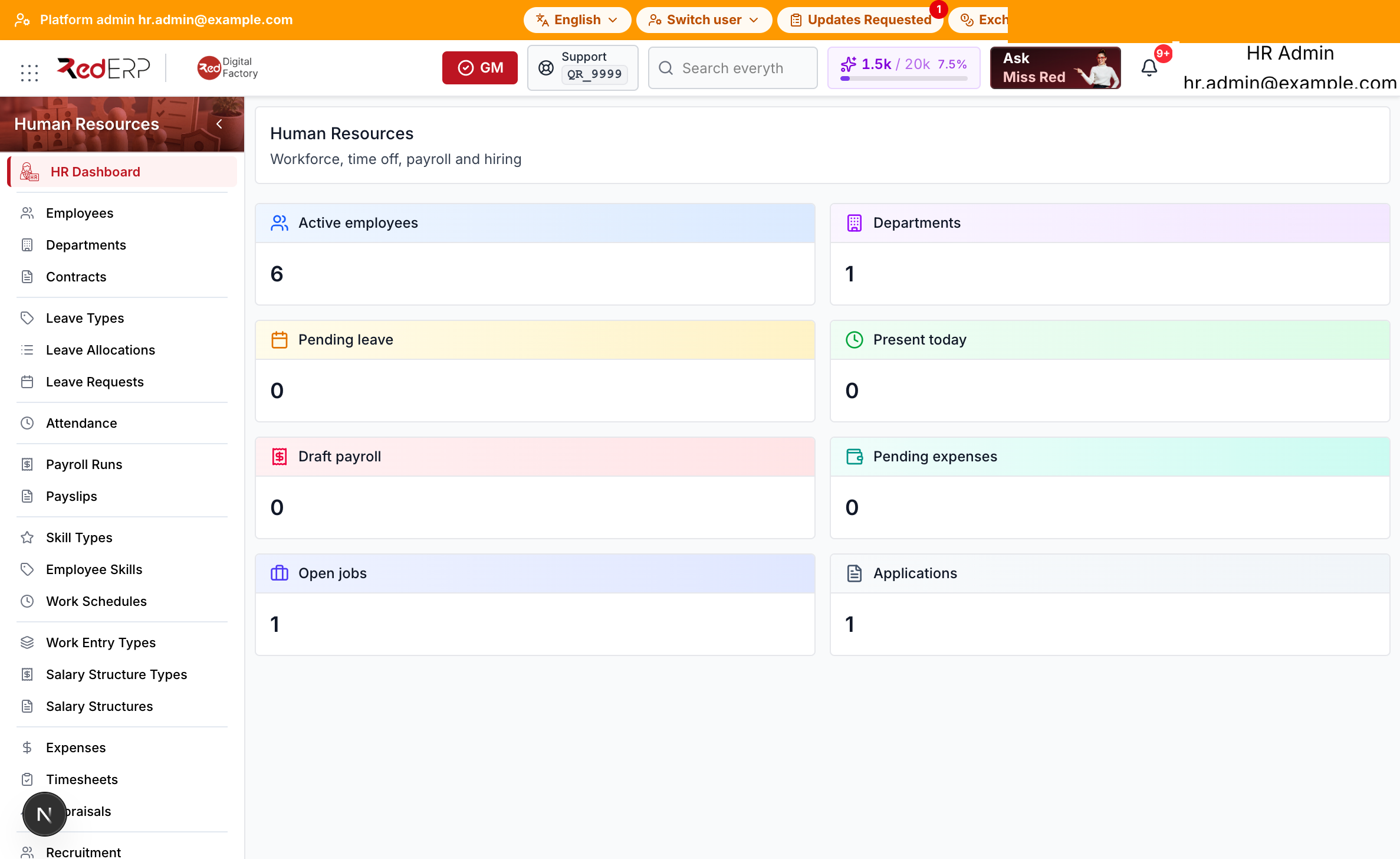
The header title is Human Resources. The subtitle is Workforce, time off, payroll and hiring.
The KPI tiles show:
- Active employees
- Departments
- Pending leave
- Present today
- Draft payroll
- Pending expenses
- Open jobs
- Applications
Open the other HR screens from the sidebar.
Sidebar sections
| Menu item | Path | Purpose |
|---|---|---|
| HR Dashboard | /modules/hr | Review workforce, leave, payroll, and hiring totals |
| Employees | /modules/hr/employees | Create and maintain people records |
| Departments | /modules/hr/departments | Group employees into teams |
| Contracts | /modules/hr/contracts | Store wage, dates, type, and contract state |
| Leave Types | /modules/hr/leave-types | Define leave catalogs used by allocations and requests |
| Leave Allocations | /modules/hr/leave-allocations | Grant yearly leave balances |
| Leave Requests | /modules/hr/leaves | Submit and approve time off |
| Attendance | /modules/hr/attendance | Record daily check-in and hours |
| Payroll Runs | /modules/hr/payroll | Compute and validate a pay period |
| Payslips | /modules/hr/payroll/payslips | Review slips produced by a run |
| Skill Types | /modules/hr/skill-types | Maintain the skill catalog |
| Employee Skills | /modules/hr/employee-skills | Attach a skill and level to a person |
| Work Schedules | /modules/hr/work-schedules | Define expected working hours |
| Work Entry Types | /modules/hr/work-entry-types | Classify work entries used in payroll |
| Salary Structure Types | /modules/hr/salary-structure-types | Group salary structures |
| Salary Structures | /modules/hr/salary-structures | Define wage rules |
| Expenses | /modules/hr/expenses | Record individual expense claims |
| Timesheets | /modules/hr/timesheets | Log worked hours |
| Appraisals | /modules/hr/appraisals | Store review cycles |
| Recruitment | /modules/hr/recruitment | Work the application kanban |
| Job Openings | /modules/hr/recruitment/openings | Publish vacancies |
| Applications | /modules/hr/recruitment/applications | Review candidates |
| Public Holidays | /modules/hr/public-holidays | Mark non-working days |
| Accrual Plans | /modules/hr/accrual-plans | Configure leave accrual rules |
| Expense Sheets | /modules/hr/expense-sheets | Group several expenses into one sheet |
| Training Courses | /modules/hr/training/courses | Maintain the course catalog |
| Training Sessions | /modules/hr/training/sessions | Schedule course sessions |
| Employee Documents | /modules/hr/employee-documents | Attach files to a person |
| Departure Reasons | /modules/hr/departure-reasons | Catalog used when you archive an employee |
| Reports | /modules/hr/reports | Headcount, leave, attendance and payroll totals |
Initial setup checklist
- Open Departments and add the teams people belong to.
- Add Employees, then assign a department.
- Add at least one Open contract for each employee who should be paid.
- Create Leave Types, then grant Leave Allocations.
- Add Work Schedules if you record attendance against expected hours.
- Add Departure Reasons before you archive an employee.
- Create a Payroll Run, Compute it, then Validate.
- Add Job Openings if you hire through Recruitment, then review Applications.
- Open Reports for headcount, leave, attendance and payroll totals.
Important concepts
- Employees and departments are different records. A department groups people. Assign the department on the employee.
- A contract is required for payroll compute. Keep the contract Open. Closed or cancelled contracts are not used when you compute a run.
- Leave types, allocations, and requests are separate. Configure the type, grant the allocation, then submit the request. Approve when the balance allows.
- Payroll follows Draft → Compute → Verified → Validate → Done. Compute builds payslips from open contracts.
- Expenses and expense sheets are different. An expense is one claim. An expense sheet groups several expenses.
- Recruitment records are shared. Job openings and applications are the same records as the Job Application Portal.
- Archive uses a departure reason. Archive Employee asks for Departure Reason, Departure Date, and Notes.
- Reports is a sidebar item. Open Human Resources → Reports for headcount, leave, attendance and payroll totals.
Related guides
- Employees & Departments
- Contracts
- Leave & Attendance
- Payroll & Payslips
- Skills & Schedules
- Work Entries & Salary Structures
- Expenses & Timesheets
- Appraisals & Recruitment
- Job Openings & Applications
- Public Holidays & Accrual Plans
- Expense Sheets & Training
- Documents & Departure
- Reports
- Job Application Portal